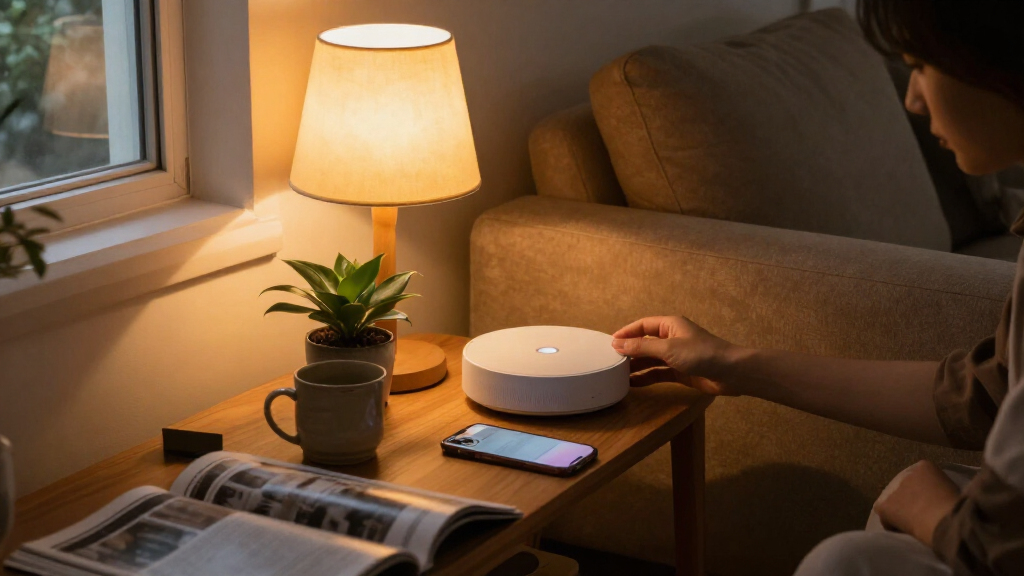

AI-powered smart home hubs vary widely: some focus on voice and screen controls, while others connect protocols, sensors, cameras, or advanced automations. I’d put the Amazon Echo Hub 8-Inch first for accessible, visual control, with the Home Assistant Green standing out for hands-on customization and the Aqara Hub M100 for compact Thread and Zigbee support. The main tradeoffs are simplicity versus control, broad device compatibility versus ecosystem focus, and cloud features versus local processing. A hub’s “AI” label alone does not tell you how much it can automate or which devices it can connect. Read on for the full breakdown of all 13 options and how I’d match them to different homes.

Get business pricing on tech for your team
- Business-only prices and quantity discounts
- Tax-exempt purchasing
- Multiple users, one account, clear invoices
Key Takeaways
- Interface and flexibility split the leading picks: Echo Hub offers a straightforward visual control point, while Home Assistant Green is better suited to owners who want to shape their own automations.
- Protocol support matters more than a broad AI claim: Matter, Thread, Zigbee, and Z-Wave support differ across the lineup, so check the devices you already own before choosing.
- Several SwitchBot hubs solve distinct problems: Hub Mini is a simple IR remote bridge, Hub 2 adds environmental sensors, and Hub 3 adds a screen and physical dial.
- Lighting-focused buyers have a narrower choice: Philips Hue Bridge Pro is built around Hue lighting, while general-purpose hubs aim to connect more types of devices.
- Camera and local storage features change the decision: SwitchBot’s AI Hub options add camera-related capabilities, but buyers should weigh those against privacy preferences and their need for a broader controller.
| Amazon Echo Hub 8-Inch Smart Home Control Panel |  | Best for a Wall-Mounted Control Center | Display: 8-inch touchscreen, 1280 × 800 | Protocols: Wi-Fi, Bluetooth, Zigbee, Matter, Thread, Sidewalk | Sensors: Passive infrared proximity and ambient light | VIEW LATEST PRICE | See Our Full Breakdown |
| SwitchBot Hub Mini Smart Remote with IR Blaster |  | Best for Infrared Appliance Control | Model: W0202200 | Connectivity: 2.4 GHz Wi-Fi | Control type: Infrared and button control | VIEW LATEST PRICE | See Our Full Breakdown |
| Aeotec Smart Home Hub 2 V4 with Matter and Zigbee |  | Best for Local SmartThings Automations | Model: V4 Smart Home Hub 2 (2025) | Model number: GP-AEOHUBV4US | Connectivity: Wi-Fi and Ethernet | VIEW LATEST PRICE | See Our Full Breakdown |
| Philips Hue Bridge Pro Smart Lighting Hub, 1-Pack |  | Best for Large Philips Hue Lighting Setups | Processor: 1.7 GHz quad-core Cortex-A35 | Memory: 4 GB DDR4 SDRAM | Capacity: 150+ lights and 50+ accessories | VIEW LATEST PRICE | See Our Full Breakdown |
| Aeotec Smart Home Hub (V3), SmartThings, Z-Wave, Zigbee, and Matter Gateway |  | Best for Z-Wave Compatibility | Model: V3 Smart Home Hub (2020) | Model number: GP-AEOHUBV3US | Connectivity: Ethernet, Wi-Fi, Z-Wave, Zigbee, Matter | VIEW LATEST PRICE | See Our Full Breakdown |
| SwitchBot Hub 2 Smart Home Hub with Thermometer, Hygrometer, Light Sensor, and IR Remote |  | Best for Sensor-Based Automation | Temperature accuracy: ±0.36°F | Humidity accuracy: ±1.8% RH | Sensors: Temperature, humidity, and light | VIEW LATEST PRICE | See Our Full Breakdown |
| Tapo H110 Matter-Certified Smart IR and IoT Hub with Chime |  | Best for Legacy Appliance Control | Model: H110 | Connectivity: 2.4 GHz Wi-Fi, infrared, and Matter | IR compatibility: More than 8,000 brands; 18 appliance types | VIEW LATEST PRICE | See Our Full Breakdown |
| SwitchBot Hub 3 Smart Home Hub with IPS Screen, Physical Dial, IR Control, and Matter Bridge | 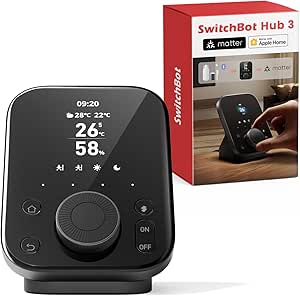 | Best for Hands-On Control | Model: W7202100 | Dimensions: 3.7 × 3.7 × 4.9 inches | Weight: 15.8 ounces | VIEW LATEST PRICE | See Our Full Breakdown |
| SwitchBot AI Hub Bundle with PTC Plus 5MP Pan-Tilt Camera |  | Best for Camera-Centered Local Setups | Camera resolution: 5MP | Pan range: 360° horizontal and 115° vertical | Camera connectivity: 2.4 GHz Wi-Fi | VIEW LATEST PRICE | See Our Full Breakdown |
| SONOFF Bridge-M Smart Home Hub |  | Best for Local Zigbee-to-Matter Bridging | Model: Bridge-M | Connectivity: Wi-Fi, Ethernet, and Zigbee | Wi-Fi standards: IEEE 802.11a/b/g/n/ac/ax | VIEW LATEST PRICE | See Our Full Breakdown |
| Aqara Smart Hub M100 Matter Controller with Thread and Zigbee |  | Best Compact Multi-Protocol Bridge | Device support: Up to 20 Aqara Zigbee devices and 20 Thread devices | Connectivity: Zigbee, Thread, Matter, 2.4 GHz Wi-Fi 6 | Wi-Fi standard: 802.11ax | VIEW LATEST PRICE | See Our Full Breakdown |
| Home Assistant Green Smart Home Hub |  | Best for Flexible Local Control | Operating system: Home Assistant OS | Processor: Quad-core | Memory: 4 GB LPDDR4X | VIEW LATEST PRICE | See Our Full Breakdown |
| SwitchBot AI Smart Home Hub with OpenClaw Support, Local Camera Storage, Home Assistant, Matter Bridge, Dual-Band Wi-Fi, and 16GB MicroSD |  | Best for Local Camera Storage | Connectivity: Dual-band Wi-Fi | Smart home software: Home Assistant pre-installed; Matter Bridge | Included storage: 16GB MicroSD card | VIEW LATEST PRICE | See Our Full Breakdown |
| AI-powered smart home hub | Connectivity | Model |
|---|---|---|
| Amazon Echo Hub 8-Inch Smart H | — | — |
| SwitchBot Hub Mini Smart Remot | 2.4 GHz Wi-Fi | W0202200 |
| Aeotec Smart Home Hub 2 V4 wit | Wi-Fi and Ethernet | V4 Smart Home Hub 2 (2025) |
| Philips Hue Bridge Pro Smart L | Zigbee mesh and Matter | — |
| Aeotec Smart Home Hub | Ethernet, Wi-Fi, Z-Wave, Zigbee, Matter | V3 Smart Home Hub (2020) |
| SwitchBot Hub 2 Smart Home Hub | 2.4 GHz Wi-Fi and Bluetooth | — |
| Tapo H110 Matter-Certified Sma | 2.4 GHz Wi-Fi, infrared, and Matter | H110 |
| SwitchBot Hub 3 Smart Home Hub | 2.4 GHz Wi-Fi, Bluetooth, and infrared | W7202100 |
| SwitchBot AI Hub Bundle with P | — | — |
| SONOFF Bridge-M Smart Home Hub | Wi-Fi, Ethernet, and Zigbee | Bridge-M |
| Aqara Smart Hub M100 Matter Co | Zigbee, Thread, Matter, 2.4 GHz Wi-Fi 6 | — |
| Home Assistant Green Smart Hom | Ethernet and USB | — |
| SwitchBot AI Smart Home Hub wi | Dual-band Wi-Fi | W8002100 |
More Details on Our Top Picks
Amazon Echo Hub 8-Inch Smart Home Control Panel
The Echo Hub is the clearest fit for households that want a shared screen for controlling devices, routines, cameras, and security systems. Its 8-inch customizable dashboard keeps those controls visible in one place, while Zigbee, Matter, and Thread support gives it broader reach than the SwitchBot Hub Mini, which focuses on infrared appliances. The included wall mount and power adapter make installation more straightforward, though a tabletop stand and cable-hiding accessories require separate purchases. This is a fixed control panel, not a portable screen, and it depends on an internet connection over Wi-Fi or Ethernet. I’d choose it for a central household interface; buyers who want local automations to keep running during internet outages may prefer the Aeotec Smart Home Hub 2 V4.
Pros:- Customizable dashboard with resizable controls makes frequent actions easy to reach.
- Zigbee, Matter, and Thread support covers several device protocols.
- Wall mount and power adapter are included.
- Microphone-off button provides a direct privacy control.
Cons:- Requires internet access through Wi-Fi or Ethernet.
- Tabletop stand and cable-hiding accessories are sold separately.
- Fixed installation makes it unsuitable as a handheld controller.
Best for: Households that want a shared, wall-mounted touchscreen for controlling compatible devices, cameras, routines, and security systems.
Not ideal for: Buyers who need a portable controller, a ready-to-use tabletop setup, or internet-independent smart home control.
- Display:8-inch touchscreen, 1280 × 800
- Protocols:Wi-Fi, Bluetooth, Zigbee, Matter, Thread, Sidewalk
- Sensors:Passive infrared proximity and ambient light
- Audio:Pair of top-ported full-range speakers with stereo playback
- Power:12.5 W adapter included; compatible USB-C PD accessories supported
- Power over Ethernet:Supported with a compatible USB-C converter
- Mounting:Wall mount included; tabletop stand sold separately
Our verdict“Choose the Echo Hub if you want a dedicated wall screen for managing a broad mix of compatible smart home devices.”
SwitchBot Hub Mini Smart Remote with IR Blaster
The SwitchBot Hub Mini gives older infrared appliances a place in app and voice routines without requiring a full smart home controller. It can learn compatible remotes and control up to 10 infrared devices, such as TVs and air conditioners. That makes it a focused complement to broader hubs like the Amazon Echo Hub, whose screen and Zigbee, Matter, and Thread support cover a wider range of device types. The tradeoff is that the Hub Mini only communicates over 2.4 GHz Wi-Fi and relies on a clear infrared path; walls or misplaced furniture can interrupt commands. It has no touchscreen or listed local automation support. I’d pick it when the main goal is remote control for existing appliances, not as the center of a sensor-rich smart home.
Pros:- Learns compatible infrared remotes through smart learning mode.
- Controls multiple infrared appliances from one app.
- Works with Alexa, Google Assistant, Siri, and IFTTT.
- Compact USB-powered body is easy to place near appliances.
Cons:- Supports 2.4 GHz Wi-Fi only.
- Infrared commands need a clear line of sight.
- Does not provide the touchscreen or broader device protocol coverage of the Amazon Echo Hub.
Best for: People who want to add infrared TVs, air conditioners, and similar appliances to app or voice control.
Not ideal for: Buyers building a broad sensor-based smart home or needing controls that work through walls and obstructions.
- Model:W0202200
- Connectivity:2.4 GHz Wi-Fi
- Control type:Infrared and button control
- Supported devices:Up to 10 infrared appliances
- Maximum range:120 meters
- Power:USB
- Dimensions:2.56 × 2.56 × 0.79 inches
- Voice assistants:Alexa, Google Assistant, Siri, IFTTT
Our verdict“Choose the Hub Mini if infrared appliance control is your main need and you can place it within clear view of the devices.”
Aeotec Smart Home Hub 2 V4 with Matter and Zigbee
The Aeotec Smart Home Hub 2 V4 suits buyers who want SmartThings routines to keep working through a temporary internet outage. Its local automation support, plus Wi-Fi or Ethernet networking, gives it a practical reliability advantage over the SwitchBot Hub Mini, which is built around infrared appliance commands. Matter and Zigbee provide routes to compatible devices, and Alexa and Google Assistant add voice control. The main compatibility gap is clear: this version does not support Z-Wave. That makes it a narrower choice than the Aeotec Smart Home Hub V3, which includes Z-Wave alongside Zigbee and Matter. It also lacks the Echo Hub’s touchscreen, so control happens through the SmartThings app or supported voice assistants. I’d put it on the shortlist for SmartThings households that prioritize local routines over an on-wall interface.
Pros:- Local automations can continue during temporary internet outages.
- Supports Matter and Zigbee devices through SmartThings.
- Offers both Wi-Fi and Ethernet connectivity.
- Compatible with Alexa and Google Assistant.
Cons:- Does not support Z-Wave.
- No built-in screen for at-a-glance household control.
Best for: SmartThings users with Matter or Zigbee devices who want compatible automations to continue during temporary internet outages.
Not ideal for: Households with Z-Wave devices or buyers who want a built-in touchscreen control panel.
- Model:V4 Smart Home Hub 2 (2025)
- Model number:GP-AEOHUBV4US
- Connectivity:Wi-Fi and Ethernet
- Protocols:Matter, Zigbee, SmartThings
- Local automations:Supported
- Z-Wave:Not supported
- Voice assistants:Amazon Alexa and Google Assistant
Our verdict“Choose the V4 if local SmartThings automations and Matter or Zigbee support matter more to you than Z-Wave or a touchscreen.”
Philips Hue Bridge Pro Smart Lighting Hub, 1-Pack
The Philips Hue Bridge Pro is the specialized choice here: it gives a large Hue lighting system room to grow, with support for 150+ lights and 50+ accessories and storage for up to 500 scenes. Its Zigbee mesh is built around lighting, while Matter and compatibility with Apple Home, Alexa, Google, and SmartThings help Hue devices connect with wider home platforms. The Echo Hub is a better pick for a visible, general-purpose control screen; the Bridge Pro instead prioritizes the scale and management of Hue lighting. MotionAware can use three Hue devices to detect movement without separate motion sensors, but that feature depends on already owning enough Hue hardware. Since it is designed for the Hue system, it makes less sense as a standalone hub for mixed-brand devices.
Pros:- Supports more than 150 lights and 50 accessories.
- Stores up to 500 personalized scenes.
- Zigbee mesh connects Hue devices independently of Wi-Fi.
- MotionAware can use three Hue devices to detect movement without separate motion sensors.
Cons:- Designed for use with the Philips Hue system.
- MotionAware requires at least three Hue devices.
Best for: Hue owners expanding a large lighting setup who want extensive scene storage and motion-triggered lighting using compatible Hue devices.
Not ideal for: Buyers seeking a general-purpose hub for mixed-brand devices or those without several Hue devices for MotionAware.
- Processor:1.7 GHz quad-core Cortex-A35
- Memory:4 GB DDR4 SDRAM
- Capacity:150+ lights and 50+ accessories
- Scene storage:Up to 500 personalized scenes
- Connectivity:Zigbee mesh and Matter
- Compatible platforms:Apple Home, Alexa, Google, Samsung SmartThings
- Motion sensing:Hue MotionAware with three Hue devices
- Dimensions:3.68 × 3.68 × 1.06 inches
Our verdict“Choose the Bridge Pro if your smart home centers on a growing Hue lighting system and its scene and motion features fit your setup.”
Aeotec Smart Home Hub (V3), SmartThings, Z-Wave, Zigbee, and Matter Gateway
The Aeotec Smart Home Hub V3 is the more suitable Aeotec option for homes that rely on Z-Wave devices. It combines Z-Wave Plus, Zigbee, and Matter support with Wi-Fi or Ethernet, app control, voice control, and local automations. That broader protocol mix distinguishes it from the newer Aeotec Smart Home Hub 2 V4, which drops Z-Wave. For buyers with an established Z-Wave setup, the V3 can preserve a route to those devices while adding Matter and SmartThings control. The tradeoffs are its North America design focus and the need to choose this specific V3 model for Z-Wave Plus support. Unlike the Amazon Echo Hub, it has no touchscreen interface, so the SmartThings app or a compatible voice assistant handles day-to-day control.
Pros:- Supports Z-Wave Plus, Zigbee, and Matter.
- Connects through Wi-Fi or Ethernet.
- Many automations can run locally.
- Supports app and voice control through Alexa or Google Assistant.
Cons:- Designed for use in North America.
- Z-Wave Plus support is specific to the V3 model.
- Does not include a touchscreen interface.
Best for: North American SmartThings households with Z-Wave Plus devices that also want Zigbee and Matter support.
Not ideal for: Buyers outside North America or those who want a touchscreen hub for direct household control.
- Model:V3 Smart Home Hub (2020)
- Model number:GP-AEOHUBV3US
- Connectivity:Ethernet, Wi-Fi, Z-Wave, Zigbee, Matter
- Z-Wave frequency:908.42 MHz
- Control methods:App and voice
- Compatible assistants:Amazon Alexa and Google Assistant
- Weight:1.1 pounds
- Warranty:1 year
Our verdict“Choose the V3 if your North American SmartThings setup needs Z-Wave alongside Zigbee and Matter.”
SwitchBot Hub 2 Smart Home Hub with Thermometer, Hygrometer, Light Sensor, and IR Remote
The SwitchBot Hub 2 is a strong fit for homes where temperature, humidity, and light readings should shape automations as well as control infrared appliances. Those sensors give it a more environment-aware role than the Tapo H110, which puts more emphasis on broad appliance control and a built-in chime. Hub 2 can learn remotes for devices such as TVs and air conditioners, while its two physical buttons make frequent scenes easy to trigger without opening an app. The tradeoff is that its Matter support is described for compatible SwitchBot products, so it is less of a general bridge than the SONOFF Bridge-M for certain Zigbee and BTHome devices. Its 2.4 GHz Wi-Fi limit and six-device maximum also make it a focused hub rather than a hub for a sprawling setup.
Pros:- Combines temperature, humidity, and light sensing with infrared remote control.
- Sensor readings can trigger automated scenes.
- Two programmable physical buttons offer quick scene control.
- Matter support connects compatible SwitchBot devices to supported platforms.
Cons:- Wi-Fi is limited to the 2.4 GHz band.
- Matter support is described for select SwitchBot devices rather than broad device bridging.
- Supports a maximum of six devices.
Best for: SwitchBot households that want sensor-triggered scenes for comfort and lighting alongside control of infrared appliances.
Not ideal for: People building a large mixed-brand setup who need broad Matter bridging or more than six supported devices.
- Temperature accuracy:±0.36°F
- Humidity accuracy:±1.8% RH
- Sensors:Temperature, humidity, and light
- Maximum supported devices:6
- Connectivity:2.4 GHz Wi-Fi and Bluetooth
- Maximum range:10 meters
- Buttons:2
- Compatible assistants:Amazon Echo, Google Assistant, IFTTT, Siri Shortcuts, and SmartThings
Our verdict“Choose Hub 2 if sensor-driven comfort scenes matter more than broad device bridging or expansion.”
Tapo H110 Matter-Certified Smart IR and IoT Hub with Chime
The Tapo H110 earns its place through breadth: its infrared control covers thousands of brands and many appliance types, from TVs and air conditioners to fans and projectors. That makes it a more natural choice for bringing older remotes into app, voice, schedule, and location-based routines than the SwitchBot Hub 2, whose appeal leans more toward built-in environmental sensing. The H110 also adds a customizable 93 dB chime and local processing for core automations during internet outages, giving it a practical alerting role. Its limits are straightforward: infrared still needs a usable line and range to appliances, and the USB-C cable does not include the required power adapter. Buyers seeking sensor readings on the hub itself should look at Hub 2 instead.
Pros:- Infrared control supports more than 8,000 brands and 18 appliance types.
- Combines Matter hub functions, IR control, and a customizable chime.
- Offers app, voice, schedule, and location-based control.
- Local processing supports core automations during internet outages.
Cons:- A 5V/2A USB power adapter is required and sold separately.
- Infrared commands are limited by appliance range and placement.
- Does not provide the built-in temperature, humidity, and light sensing found on SwitchBot Hub 2.
Best for: Households with several infrared-controlled appliances that want to add voice, scheduled, or location-based control.
Not ideal for: Buyers who want built-in environmental sensors or cannot provide a separate 5V/2A USB power adapter.
- Model:H110
- Connectivity:2.4 GHz Wi-Fi, infrared, and Matter
- IR compatibility:More than 8,000 brands; 18 appliance types
- Built-in alarm:93 dB
- Voice assistants:Amazon Alexa, Google Assistant, and Apple Siri
- Power:5V/2A USB adapter required; sold separately
- Operating temperature:32°F–104°F (0°C–40°C)
- App compatibility:iOS 12 or later; Android 6.0 or later
Our verdict“Pick the H110 if controlling a varied collection of infrared appliances is your main smart-home gap.”
SwitchBot Hub 3 Smart Home Hub with IPS Screen, Physical Dial, IR Control, and Matter Bridge
The SwitchBot Hub 3 puts status and adjustment within reach: its IPS screen shows home information, while a rotary dial and four customizable buttons make common controls tangible. That gives it a different appeal from the SwitchBot Hub 2, which offers temperature, humidity, and light sensing with two buttons but lacks this screen-and-dial control layout. Hub 3 also combines infrared appliance control with SwitchBot and compatible Matter devices, so one bedside or living-room unit can handle both older remotes and newer gear. The costs in convenience are setup and dependency: Matter devices must share a 2.4 GHz network, and some displayed information depends on separately sold devices. It is a better fit for people who want to adjust settings at the hub than for buyers seeking an unobtrusive bridge.
Pros:- IPS screen displays temperature, humidity, and other home status information.
- Rotary dial supports adjustments in 1°C increments.
- Four customizable buttons provide direct access to scenes.
- Controls compatible infrared appliances, SwitchBot devices, and Matter devices.
Cons:- Matter setup requires compatible devices to share a 2.4 GHz Wi-Fi network.
- Some displayed information and features require separately sold devices.
- Its larger screen-and-control design takes more space than a simple remote hub.
Best for: Smart-home owners who want a visible status display and physical dial for frequent lighting or temperature adjustments.
Not ideal for: Buyers seeking a minimal, low-profile bridge or expecting every displayed reading without additional devices.
- Model:W7202100
- Dimensions:3.7 × 3.7 × 4.9 inches
- Weight:15.8 ounces
- Display:IPS screen
- Controls:Rotary dial and four customizable buttons
- Temperature sensor accuracy:±0.2°C
- Connectivity:2.4 GHz Wi-Fi, Bluetooth, and infrared
- Infrared appliance support:More than 100,000 compatible appliances
Our verdict“Choose Hub 3 if you want a central, hands-on control point with a screen and physical dial.”
SwitchBot AI Hub Bundle with PTC Plus 5MP Pan-Tilt Camera
This SwitchBot AI Hub bundle is the most camera-centered pick here: it pairs a 5MP pan-tilt camera with local event storage, Matter bridging, and support for Home Assistant. The included 16GB MicroSD card gets local recording started, with room to expand storage, and the camera’s wide pan and tilt coverage can help monitor a larger indoor area than a fixed viewpoint. Compared with the SONOFF Bridge-M, this bundle brings video monitoring and camera management into the hub role; SONOFF is more focused on bridging Zigbee, BTHome, and eWeLink devices. The tradeoff is that AI features require a subscription, and the camera uses 2.4 GHz Wi-Fi. This is a specialized choice for buyers who want monitoring tied into a local smart-home setup, not a simple universal controller.
Pros:- Includes a 5MP pan-tilt camera with night vision and two-way audio.
- Comes with 16GB MicroSD storage and supports expanded local storage.
- Combines camera management with Home Assistant gateway and Matter Bridge features.
- Supports local OpenClaw deployment for compatible smart-home devices.
Cons:- AI features require a subscription.
- Camera connectivity is limited to 2.4 GHz Wi-Fi.
- Its camera-centered feature set may be unnecessary for buyers who only need device bridging.
Best for: Home Assistant users who want a pan-tilt indoor camera, local event storage, and Matter bridging in one bundle.
Not ideal for: Buyers who want AI camera features without a subscription or need a camera that uses a different Wi-Fi band.
- Camera resolution:5MP
- Pan range:360° horizontal and 115° vertical
- Camera connectivity:2.4 GHz Wi-Fi
- Storage included:16GB MicroSD card
- Expandable storage:Up to 1TB MicroSD or 16TB external hard drive
- Compatible camera capacity:Up to 8 cameras
- Hub connectivity:Wi-Fi, Bluetooth, Matter, RTSP, and Ethernet
- Recording mode:Event
Our verdict“Choose this bundle if local camera monitoring and Home Assistant integration are central to your hub plans.”
SONOFF Bridge-M Smart Home Hub
The SONOFF Bridge-M is aimed at a narrower but useful job: bringing compatible Zigbee, BTHome, and eWeLink devices into Matter platforms while keeping local management available through a web console. For Home Assistant users, MQTT integration adds another route into an existing system, a more technical proposition than the app-and-remote approach of the Tapo H110. The built-in 90 dB alarm and mobile notifications also suit a local security setup. The defining limitation matters before buying: Bridge-M is a Matter bridge, not a Matter controller, so it cannot add Matter devices directly. Buyers who want one hub to control infrared appliances or onboard new Matter devices should look at the H110 or another hub with those roles. Compatibility also depends on the devices and platforms involved.
Pros:- Bridges compatible Zigbee, BTHome, and eWeLink devices to Matter platforms.
- Local web console works over the LAN without requiring cloud services.
- Supports Home Assistant integration through MQTT.
- Built-in 90 dB alarm and mobile notifications support security setups.
Cons:- Does not act as a Matter controller and cannot add Matter devices directly.
- Functionality depends on compatible devices and platforms.
- Lacks the infrared appliance control offered by the Tapo H110.
Best for: Home Assistant users with compatible Zigbee, BTHome, or eWeLink devices who want local bridging into Matter platforms.
Not ideal for: People who need a Matter controller to add Matter devices directly or want infrared appliance control.
- Model:Bridge-M
- Connectivity:Wi-Fi, Ethernet, and Zigbee
- Wi-Fi standards:IEEE 802.11a/b/g/n/ac/ax
- Zigbee standard:IEEE 802.15.4
- Frequency:2.4 GHz
- Ports:1
- Alarm volume:90 dB
- Warranty:2 years
Our verdict“Pick Bridge-M if you need a local bridge for compatible Zigbee-family devices and already have a Matter controller.”
Aqara Smart Hub M100 Matter Controller with Thread and Zigbee
Thread and Aqara Zigbee support make the M100 a compact way to connect two device families and bridge compatible Aqara products into Matter ecosystems such as Apple Home, Alexa, and Home Assistant. Its local automations can keep supported routines running without Wi-Fi or cloud access, which gives it an edge over hubs that depend more heavily on remote services. Compared with the Home Assistant Green, the M100 is simpler and smaller, but it supports fewer devices and lacks Green’s broader expansion through USB adapters. The main limitation is its Aqara focus: it does not support third-party Zigbee devices, so it is a poor fit for a mixed-brand Zigbee collection. Cloud push notifications still need a cloud connection, and buyers must supply a compatible USB-A power adapter.
Pros:- Connects up to 20 Aqara Zigbee devices and 20 Thread devices
- Bridges compatible Aqara products to Matter ecosystems
- Local automations for Zigbee and Matter devices can run without Wi-Fi or cloud access
- USB-A power and a 210-degree adjustable shaft allow flexible placement
Cons:- Does not support third-party Zigbee devices
- 5 V, 0.5 A power adapter is not included
- Cloud push notifications require a cloud connection
Best for: Aqara users who want a small Matter bridge for a modest mix of Aqara Zigbee and Thread devices
Not ideal for: Households with third-party Zigbee devices or a large, mixed-brand setup that needs broader hub expansion
- Device support:Up to 20 Aqara Zigbee devices and 20 Thread devices
- Connectivity:Zigbee, Thread, Matter, 2.4 GHz Wi-Fi 6
- Wi-Fi standard:802.11ax
- Security:WPA3
- Automation:Local automation for Zigbee and Matter devices
- Power:USB-A; requires 5 V, 0.5 A adapter, not included
- Adjustable shaft:210-degree range
- Operating system:Linux
Our verdict“Choose the M100 for a compact Aqara-centered setup with local routines; choose Home Assistant Green for broader expansion and control.”
Home Assistant Green Smart Home Hub
Home Assistant OS comes preinstalled, making Green a clear pick for buyers who want a flexible automation platform with home data stored locally. Its fanless design runs silently, and its USB ports let you add separate Zigbee, Z-Wave, or Thread adapters as your setup grows. That flexibility is the key difference from the Aqara M100: Green can support a wider mix of technologies, but those radios are not built in and require extra hardware. Getting started also requires Ethernet, so it is less convenient where the router is far from the hub. Compared with the SwitchBot AI Smart Home Hub, Green focuses on the Home Assistant platform rather than bundled camera storage and camera capacity. Local storage and expansion options suit hands-on smart home owners, while the setup asks more of them.
Pros:- Home Assistant OS is preinstalled
- Stores home data locally on the hub
- Compact, fanless design operates silently
- Two USB ports support optional Z-Wave, Zigbee, and Thread adapters
Cons:- Requires Ethernet to get started
- Z-Wave, Zigbee, and Thread connectivity requires separate USB adapters
Best for: Home automation enthusiasts who want local data storage and plan to add compatible radios or devices over time
Not ideal for: Buyers seeking a wireless, ready-to-use hub with Zigbee, Z-Wave, or Thread built in
- Operating system:Home Assistant OS
- Processor:Quad-core
- Memory:4 GB LPDDR4X
- Storage:32 GB
- Connectivity:Ethernet and USB
- USB ports:2
- Dimensions:4.41 x 4.41 x 1.26 inches
- Weight:12 ounces
Our verdict“Pick Home Assistant Green if local control and future expansion matter more than built-in radios or a wireless setup.”
SwitchBot AI Smart Home Hub with OpenClaw Support, Local Camera Storage, Home Assistant, Matter Bridge, Dual-Band Wi-Fi, and 16GB MicroSD
This SwitchBot hub is the most camera-focused pick here: it supports up to eight compatible cameras, records events to the included 16GB MicroSD card, and allows storage expansion. With Home Assistant pre-installed and a Matter Bridge, it also links supported smart home devices, while local automations cover select SwitchBot BLE products. Compared with Home Assistant Green, it adds camera storage out of the box, but Green is smaller and offers a more straightforward path to adding separate radio adapters. The AI label has limits: AI camera features require an AI+ subscription and compatible cameras. This hub also lacks infrared control, so it cannot take the place of SwitchBot’s IR-equipped remotes for TVs or air conditioners. Its larger body makes the most sense where cameras are a core part of the setup.
Pros:- Includes a 16GB MicroSD card for local camera event storage
- Supports up to eight compatible cameras
- Storage can expand to a 1TB MicroSD card or 16TB external hard drive
- Home Assistant and a Matter Bridge are included, with local automations for select SwitchBot BLE devices
Cons:- AI camera features require an AI+ subscription and compatible cameras
- Does not include infrared control for TVs or air conditioners
- Larger and heavier than Home Assistant Green
Best for: SwitchBot households that want local event recording for compatible cameras alongside Home Assistant and a Matter Bridge
Not ideal for: Buyers who need infrared control for TVs or air conditioners, or want AI camera features without a subscription
- Connectivity:Dual-band Wi-Fi
- Smart home software:Home Assistant pre-installed; Matter Bridge
- Included storage:16GB MicroSD card
- Expandable storage:Up to 1TB MicroSD card or 16TB external hard drive
- Camera capacity:Up to 8 compatible cameras
- Dimensions:7.8 x 5.79 x 2.2 inches
- Weight:1.17 pounds
- Model:W8002100
Our verdict“Choose this SwitchBot hub if camera recording is central to your setup and you accept the subscription requirement for its AI camera features.”
How We Picked
I compared the 13 hubs by the jobs buyers actually need them to do: connect existing devices, support relevant protocols, make automations manageable, and provide a useful way to control the home. I gave more weight to clear compatibility and practical control than to AI branding, since the term can describe very different capabilities. I also considered whether a hub is focused on one ecosystem or can serve as a broader controller, and whether its added features—such as sensors, an IR blaster, screen, or camera support—solve a real household need.
The ranking favors options that balance useful control, ecosystem reach, and approachability. That puts the Echo Hub near the top for its visible control surface and the Home Assistant Green among the strongest choices for customization, while specialist products rank well for buyers whose needs match their focus. Compact remotes and lighting bridges rank lower as all-purpose hubs, though they can be the better fit when a buyer wants exactly that narrower function. I treat AI claims cautiously where the product details do not specify what the AI does.
Factors to Consider When Choosing AI-powered Smart Home Hubs
Before choosing a hub, I’d start with the devices and routines you already depend on. The right match is shaped by compatibility, control preferences, privacy needs, and how much setup you want to manage—not by the number of smart features listed on a box.
Check your devices’ protocols before buying
Make a short list of the devices you need the hub to connect, then note whether they use Matter, Thread, Zigbee, Z-Wave, Wi-Fi, or infrared. A hub can advertise broad smart home support and still miss the protocol used by a key sensor or switch. Matter can make cross-brand pairing easier, but it does not make every older device compatible or guarantee that every feature works across platforms. Thread support also depends on the controller and network setup, so check what role the hub actually plays. One common mistake is buying for a future device plan while overlooking a current lock, light, or sensor. I’d favor confirmed support for the devices in your home over a longer protocol list.
Decide how much control you want on the wall
A screen can make scenes and device status easier to reach for everyone in the household, especially when voice commands are inconvenient. A compact hub without a display may be a better fit when you mostly want devices to work in the background. Physical dials and buttons can help with repeat tasks such as adjusting lights or temperature, but they add value only if the household will use them. Think about where controls would sit and who needs access before choosing a display-oriented model. Wall-mounted panels also need a suitable location and power plan. A phone app may be enough for a small setup, while a shared control point can reduce friction in a larger household.
Separate useful automation from the AI label
Ask what the hub’s AI feature actually does: does it interpret natural-language commands, suggest routines, analyze camera footage, or simply support a voice assistant? These functions solve different problems and may depend on an account, subscription, or remote service. For dependable routines, clear triggers and conditions often matter more than conversational control. Buyers who want custom logic should look at how the hub handles rules, integrations, and troubleshooting. If the advertised AI does not connect to a task you want to automate, it should not outweigh compatibility or reliability. I’d choose a specific capability over a vague promise of a smarter home.
Choose between local control and cloud dependence
Local processing can keep some automations working when an internet connection is down and may reduce how much device data leaves the home. Cloud features can make remote access and voice services more convenient, but they rely on a vendor’s servers and account policies. These are not always an all-or-nothing choice: a product may process some routines locally while relying on the cloud for other functions. Check which features stop during an outage and whether a subscription is needed for the functions you care about. Camera storage deserves separate attention because local recording and cloud recording have different privacy and access tradeoffs. Choose the balance that matches your comfort level and home network.
Match setup effort to your comfort level
Some hubs are designed for app-based pairing and simple scenes, while more flexible platforms can ask you to manage integrations, rules, and occasional troubleshooting. That extra effort can pay off if you want unusual combinations of brands or detailed control over automations. It can become a burden if other household members need a setup that works without maintenance. Consider who will update the system and fix a routine that stops behaving as expected. A beginner can still choose a flexible hub, but should be ready to learn its ecosystem before moving essential functions onto it. For a small setup, easy onboarding may matter more than maximum configurability.
Pay for capabilities you will actually use
Extra sensors, camera features, displays, and remote-control hardware can reduce the need for separate devices, but only if they fit your routines. A built-in thermometer may be useful for a room-specific automation, while an IR blaster helps with compatible appliances that lack network control. A lighting bridge is a focused purchase, not a shortcut to controlling every device in the home. Before paying for a premium feature set, check whether your current devices already provide the same capability. Also account for placement, power, and any ongoing service requirements. The best value comes from replacing a real gap in your setup, not accumulating features you will leave unused.
Frequently Asked Questions
Will one hub connect all the smart home devices I already own?
Usually, no single compatibility claim guarantees that every device and feature will work. Check each important device’s protocol and supported platform, especially for older Zigbee or Z-Wave products and appliances controlled by infrared. Matter can ease cross-brand pairing, but implementation and available features can still vary. If your setup spans several ecosystems, confirm that the hub supports the integrations you rely on. I’d verify your most important devices before replacing or adding a controller.
Do I need a hub with AI for smart home automations?
No: many useful automations depend on clear triggers and rules rather than AI. AI features can help with natural-language control, recommendations, or camera analysis, but those are distinct functions and may have separate service requirements. Start by naming the routine you want, such as turning on lights when a sensor detects motion. Then check whether the hub can run that routine with your devices and whether it needs internet access. Choose AI when its specific function improves a task you will use.
Should I choose a local-first hub if my internet is unreliable?
It can help, but check which functions actually run locally. Some hubs keep device-to-device routines available during an outage, while voice assistants, remote access, or cloud analysis may stop working. A local controller may also need more setup than a simple cloud-connected option. Write down which routines must keep working without internet, then confirm that the hub supports them offline. This makes the local-versus-cloud choice concrete instead of relying on a general privacy or reliability label.
Is a screen-equipped hub worth it if I already use a phone app?
A screen is most useful when household members need a shared, visible control point or quick access to scenes and status. If one person manages the home from a phone and everyone else uses voice commands, a panel may add little. Placement and power also matter: the screen should be easy to reach without becoming another device to maintain. Consider whether a physical dial or buttons would make frequent tasks quicker. The Echo Hub and SwitchBot Hub 3 illustrate different approaches to visible control, so choose based on the interactions you expect to use.
Can I start with a simple hub and move to a more advanced one later?
Yes, but plan around protocols and platform dependencies to avoid rebuilding everything. A focused IR or lighting hub can remain useful even if you later add a general-purpose controller, provided both systems can coexist in your setup. Some devices may need to be paired again, and automations stored in one platform might not transfer. Keep a record of device pairings and routines as the system grows. For a future upgrade, prioritize hubs that support the standards and integrations you expect to use.
Conclusion
For the broadest mix of approachable control and a clear visual interface, I’d choose the Amazon Echo Hub 8-Inch as best overall. The SwitchBot Hub Mini is my best value-style pick for buyers who mainly need infrared control for compatible appliances, while the Home Assistant Green is the premium choice for people ready to build detailed, cross-brand automations. Beginners who want a compact controller for newer Matter, Thread, and Zigbee devices should look at the Aqara Hub M100. For specific needs, I’d pick the Philips Hue Bridge Pro for a Hue-centered lighting setup, the SwitchBot Hub 2 for its built-in environmental sensors, or a SwitchBot AI Hub model for buyers who specifically want camera-related features. Match the hub to your devices and the level of control you want, then use that shortlist to make the final choice.