For AI creators, external GPUs (eGPUs) can dramatically boost processing power without upgrading a laptop or desktop. The best choices combine high-performance graphics, robust connectivity, and durability. The Khadas Mind Graphics 2 stands out for its NVIDIA RTX 5060 Ti, offering excellent AI acceleration, while the GIGABYTE AORUS RTX 5090 AI Box delivers top-tier graphics for demanding workloads. However, tradeoffs include size, cost, and compatibility challenges. Continue reading for a detailed breakdown of each option and how to choose the right eGPU for your AI needs.

Get business pricing on tech for your team
- Business-only prices and quantity discounts
- Tax-exempt purchasing
- Multiple users, one account, clear invoices
Key Takeaways
- Top-performing models like the GIGABYTE RTX 5090 AI Box excel in raw AI processing power but come with higher costs and larger sizes.
- Connectivity options such as USB4 and Oculink are critical for maximizing data transfer speeds and reducing bottlenecks.
- Built-in cooling solutions like waterforce cooling improve sustained performance but often increase size and price.
- Choosing an eGPU with compatibility for PCIe 5.0 ensures future-proofing and better integration with modern systems.
- Price ranges vary widely; balancing budget with performance is key, especially for those new to AI workloads.
| Khadas Mind Graphics 2 eGPU External Graphics Card with NVIDIA RTX 5060 Ti 16GB GDDR7 |  | Best Overall for Portable High-Performance AI and Creative Work | GPU: NVIDIA RTX 5060 Ti | VRAM: 16GB GDDR7 | Output: HDMI 2.1b / DP 2.1b | VIEW ON AMAZON | See Our Full Breakdown |
| ASRock Radeon AI PRO R9700 Creator 32GB Professional Graphics Card, 2920 MHz Boost Clock, GDDR6, AMD RDNA 4, AI-Accelerators, DisplayPort 2.1a, PCIe 5.0, Blower Cooler |  | Best for Heavy-Duty AI and Content Creation in Workstations | Graphics Coprocessor: AMD Radeon AI PRO R9700 | Memory: 32 GB | GPU Clock Speed: 2920 MHz | VIEW ON AMAZON | See Our Full Breakdown |
| GIGABYTE AORUS RTX 5090 AI Box Graphics Card – 32GB GDDR7, PCIe 5.0, 2407MHz Core, 3x DP 2.1, HDMI 2.1 |  | Best for High-Performance AI Workstations and Creative Studios | Graphics Coprocessor: NVIDIA GeForce RTX 5090 | RAM: 32 GB GDDR7 | GPU Clock Speed: 2407 MHz | VIEW ON AMAZON | See Our Full Breakdown |
| ONE XPLAYER OneXGPU 2 eGPU with AMD RX 7800M 12GB GDDR6 RDNA 3 |  | Best for Mobile AI and On-the-Go Creative Work | Graphics Card: AMD Radeon RX 7800M | Graphics Memory: 12 GB GDDR6 | Video Output: HDMI 2.1, 2x DisplayPort 2.0 | VIEW ON AMAZON | See Our Full Breakdown |
| Nimo eGPU Docking Station with AMD Radeon RX 7600M XT 8GB GDDR6 | 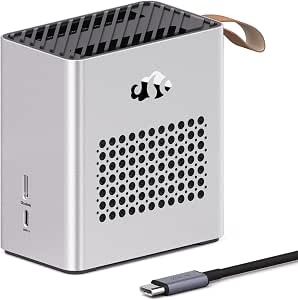 | Best for Portable AI and 4K/8K Creative Work | GPU: AMD Radeon RX 7600M XT | Performance: 120W TGP | Connectivity: USB4, OCuLink, HDMI 2.1, DisplayPort 2.0 | VIEW ON AMAZON | See Our Full Breakdown |
| GMKtec AD-GP1 External GPU Docking Station with AMD Radeon 7600M XT GPU |  | Best Portable Multi-Monitor External GPU Dock | Graphics Card: AMD Radeon 7600M XT | Graphics Memory: 8 GB GDDR6 | Graphics Architecture: RDNA 3.0 | VIEW ON AMAZON | See Our Full Breakdown |
| ASUS Turbo Radeon AI PRO R9700 32GB Graphics Card for AI Workloads |  | Best for Large AI Model Training and Heavy Compute | Graphics Coprocessor: AMD Radeon AI PRO R9700 | RAM: 32 GB | GPU Clock Speed: 2940 MHz | VIEW ON AMAZON | See Our Full Breakdown |
| Nimo eGPU External Graphics Card Enclosure with AMD Radeon RX 7600M XT, USB4 & Oculink, 8GB GDDR6, 240W PSU, Portable All-in-One Dock |  | Best Travel-Friendly External GPU for Gaming and Creative Work | Graphics Card: AMD Radeon RX 7600M XT | Memory: 8 GB GDDR6 | Hardware Interface: USB4, Oculink | VIEW ON AMAZON | See Our Full Breakdown |
| GIGABYTE AORUS RTX 3080 Gaming Box (REV2.0) eGPU with Waterforce Cooling System |  | Best High-End Gaming and Creative External GPU | Graphics Card: NVIDIA GeForce RTX 3080 | Cooling System: Waterforce All-in-One | Interface: Thunderbolt 3 | VIEW ON AMAZON | See Our Full Breakdown |
More Details on Our Top Picks
Khadas Mind Graphics 2 eGPU External Graphics Card with NVIDIA RTX 5060 Ti 16GB GDDR7
The Khadas Mind Graphics 2 stands out for combining a powerful NVIDIA RTX 5060 Ti with a compact, portable design, making it ideal for AI creators who need mobility without sacrificing performance. Compared to larger, less portable options like the GIGABYTE RTX 5090 AI Box, this model emphasizes versatility and multitasking with support for up to four displays. Its multiple I/O ports, including SD card support, and advanced cooling ensure reliable operation during intensive workloads. However, it requires BIOS and firmware updates before use, which can be a hassle, and its price and availability are not specified, making it less accessible for some users. This GPU dock is best suited for AI developers and content creators who need a portable yet powerful external GPU that can handle multitasking across several displays.
Pros:- Powerful NVIDIA RTX 5060 Ti with 16GB VRAM for demanding AI models
- Supports up to four displays for complex multitasking
- Compact, portable design with extensive I/O ports
- Advanced cooling system for quiet, reliable operation
Cons:- Requires firmware and BIOS updates before initial use
- Limited information on compatibility with specific laptops
- Price and availability are not clearly defined
Best for: AI developers and creative professionals needing portable, multi-display support
Not ideal for: Users seeking plug-and-play simplicity without firmware updates or those with limited technical expertise
- GPU:NVIDIA RTX 5060 Ti
- VRAM:16GB GDDR7
- Output:HDMI 2.1b / DP 2.1b
- PCIe:4.0 x8
- Cooling System:Multi-channel cooling
- Power Supply:350W GaN
Our verdict“This pick is best for AI creators who prioritize portability and multi-display support without sacrificing raw GPU power.”
ASRock Radeon AI PRO R9700 Creator 32GB Professional Graphics Card, 2920 MHz Boost Clock, GDDR6, AMD RDNA 4, AI-Accelerators, DisplayPort 2.1a, PCIe 5.0, Blower Cooler
The ASRock Radeon AI PRO R9700 excels in handling large AI models and high-resolution media editing thanks to its 32GB GDDR6 memory and RDNA 4 architecture with dedicated AI accelerators. It’s a clear choice for professionals working in demanding, compute-heavy environments where stability and high memory capacity are critical. While its blower cooling and focus on workstation use mean it’s less suited for noisy multi-GPU configurations, it offers robust performance for dedicated AI tasks. Compared to the GIGABYTE RTX 5090, it prioritizes memory size over raw gaming speed, making it better suited for AI and content creation rather than gaming. Its limited driver info and potential compatibility issues may require some setup effort. This card is best for AI specialists and content creators running intensive workloads in professional settings.
Pros:- High 32GB GDDR6 memory supports large AI models and 8K workflows
- Advanced RDNA 4 architecture with AI accelerators boosts performance
- Robust vapor chamber cooling for sustained workloads
- Supports PCIe 5.0 and high-res displays
Cons:- Designed mainly for workstations, potential compatibility challenges
- Blower cooling may be noisy under load
- Limited info on software and driver updates
Best for: AI researchers and content creators needing high memory capacity and workstation-level stability
Not ideal for: Enthusiasts seeking a quiet, multi-GPU setup for gaming or general use
- Graphics Coprocessor:AMD Radeon AI PRO R9700
- Memory:32 GB
- GPU Clock Speed:2920 MHz
- Video Output Interface:DisplayPort 2.1a
- Graphics RAM Type:GDDR6
- Interface:PCI-Express x16
Our verdict“This card is ideal for AI and professional creative workflows that demand large memory and stable performance in a workstation environment.”
GIGABYTE AORUS RTX 5090 AI Box Graphics Card – 32GB GDDR7, PCIe 5.0, 2407MHz Core, 3x DP 2.1, HDMI 2.1
The GIGABYTE AORUS RTX 5090 AI Box offers cutting-edge performance with 32GB GDDR7 memory and PCIe 5.0, making it perfect for AI workflows that demand maximum bandwidth and memory. Its core clock of 2407MHz ensures powerful compute capabilities, while multiple outputs including DP 2.1 and HDMI 2.1 support high-resolution, multi-monitor setups. This model clearly targets users with ample space and power capacity, contrasting with more portable options like the Khadas Mind Graphics 2. Its high power consumption and size mean it’s best suited for dedicated workstations rather than mobile setups. The premium price reflects its target audience—professional AI and media creators who need absolute top-tier hardware. This GPU is best for large AI models, deep learning, and multi-display creative work in a stationary environment.
Pros:- High-performance 32GB GDDR7 for demanding AI models
- Supports PCIe 5.0 for fast data transfer
- Multiple high-res display outputs including DP 2.1 and HDMI 2.1
- Advanced cooling for stable, continuous operation
Cons:- Large size and high power requirements
- Premium price point limits accessibility
- Requires spacious, high-capacity power supply
Best for: AI research labs and high-end creative studios with dedicated workstation setups
Not ideal for: Mobile professionals and users with limited space or power capacity
- Graphics Coprocessor:NVIDIA GeForce RTX 5090
- RAM:32 GB GDDR7
- GPU Clock Speed:2407 MHz
- Video Output Interface:DisplayPort 2.1, HDMI 2.1
- Graphics Ram Type:GDDR7
- Interface:PCI-Express x16
Our verdict“This GPU is suited for AI and creative professionals running intensive workloads in a fixed, high-performance environment.”
ONE XPLAYER OneXGPU 2 eGPU with AMD RX 7800M 12GB GDDR6 RDNA 3
The OneXGPU 2 is designed for portability, featuring an AMD RX 7800M with 12GB GDDR6, making it well-suited for AI tasks and gaming on laptops and handheld PCs. Its lightweight build and support for Thunderbolt 3/4 and USB 4 provide flexible connectivity, ideal for creators who need computing power in a portable form factor. While it offers a significant speed boost over integrated laptop GPUs, it’s less powerful than desktop-focused options like the GIGABYTE RTX 5090. Its size (9″L x 6.9″W) and reliance on USB-C/Thunderbolt ports mean it’s best for users with compatible host devices and those who prioritize mobility over raw performance. The separate OCuLink cable can be a hurdle for some. This eGPU makes sense for mobile professionals who need decent AI acceleration without the bulk of a full desktop GPU.
Pros:- Powerful AMD RX 7800M GPU with 12GB GDDR6 for AI and gaming
- Lightweight and portable at 1.59 kg
- Supports multiple display outputs including HDMI and DisplayPort
- Includes fast 300W GaN charger for simultaneous GPU and laptop charging
Cons:- Requires host device with Thunderbolt 3/4 or USB 4 port
- OCuLink cable sold separately, adding complexity
- Limited compatibility with non-Windows devices
Best for: AI creators and gamers needing portable GPU power for laptops or handheld devices
Not ideal for: Users seeking maximum GPU power or working in fixed workstation environments
- Graphics Card:AMD Radeon RX 7800M
- Graphics Memory:12 GB GDDR6
- Video Output:HDMI 2.1, 2x DisplayPort 2.0
- Dimensions:9″L x 6.9″W
- Weight:1.59 kg
- Power Supply:300W GaN fast charger
Our verdict“This eGPU is ideal for mobile creators who need a balance of portability and decent AI acceleration on their laptops.”
Nimo eGPU Docking Station with AMD Radeon RX 7600M XT 8GB GDDR6
The Nimo eGPU Docking Station provides a practical option for AI and creative tasks, featuring an AMD Radeon RX 7600M XT with 8GB GDDR6, delivering performance similar to a laptop RTX 4060. Its high-speed USB4 and OCuLink support make it suitable for portable workflows, supporting 8K and dual 4K displays with ease. The built-in 240W power supply and 65W PD fast charging add to its convenience, especially for users who need a compact, all-in-one dock for both AI and media editing. Compared to the Khadas Mind Graphics 2, this model offers more flexibility in connectivity, but it’s limited to Windows and requires compatible ports, which could restrict some users. Its relatively modest GPU power might fall short for the most demanding AI models. This station is best for mobile AI developers and creators working with high-res media on portable devices.
Pros:- GPU performance comparable to RTX 4060 Laptop GPU
- Supports 8K and dual 4K display outputs
- Built-in 240W power supply for portability
- Includes 65W PD fast charging via USB-C
Cons:- Requires compatible USB4 or OCuLink ports
- Limited to Windows devices
- GPU performance may be insufficient for the most demanding AI models
Best for: AI creators and media professionals needing portable GPU support with high-resolution display capability
Not ideal for: Users without compatible USB4 or OCuLink ports or those needing maximum GPU power
- GPU:AMD Radeon RX 7600M XT
- Performance:120W TGP
- Connectivity:USB4, OCuLink, HDMI 2.1, DisplayPort 2.0
- Power Supply:Built-in 240W
- Charging:65W PD fast charging
Our verdict“This docking station is best for portable AI and media workflows that require high-res displays and flexible connectivity.”
GMKtec AD-GP1 External GPU Docking Station with AMD Radeon 7600M XT GPU
The GMKtec AD-GP1 stands out for its combination of portability and extensive display support, making it ideal for creators who need to run multiple high-resolution monitors on the go. Compared with the Nimo eGPU, which is more compact but supports only dual 8K displays, the AD-GP1 provides four video outputs and supports 8K@60Hz across all, perfect for multi-monitor setups. However, it depends on devices with USB4 or Oculink compatibility, limiting flexibility for some users. Its lightweight design and versatile connectivity make it a clear choice for mobile professionals, but cooling vents could be a concern if placed vertically. Overall, this dock is best suited for users needing high-performance, multi-display setups in portable form factors.
Pros:- Supports four 8K displays simultaneously for extensive multitasking
- Lightweight and compact, ideal for mobile use
- Versatile connectivity options including USB4, Oculink, HDMI, and DisplayPort
Cons:- Requires compatible USB4 or Oculink interfaces, reducing device compatibility
- Cooling vents may be blocked if placed vertically, affecting thermal performance
Best for: AI creators and multimedia professionals who require portable, multi-monitor support with high-resolution output.
Not ideal for: Mac users or those with devices lacking USB4 or Oculink ports, as compatibility is limited.
- Graphics Card:AMD Radeon 7600M XT
- Graphics Memory:8 GB GDDR6
- Graphics Architecture:RDNA 3.0
- Video Outputs:2x HDMI2.1, 2x DisplayPort2.0
- Video Output Resolution:8K@60Hz
- Connectivity:Oculink, USB4, Thunderbolt 3 & 4
Our verdict“This dock makes the most sense for AI creators who need high-resolution multi-monitor setups on the move.”
ASUS Turbo Radeon AI PRO R9700 32GB Graphics Card for AI Workloads
The ASUS Turbo Radeon AI PRO R9700 is tailored for handling demanding AI workloads, thanks to its 32GB GDDR6 VRAM and RDNA 4 architecture with 128 AI Accelerators. Compared to the GIGABYTE RTX 3080 Gaming Box, which excels at gaming and creative rendering, the AI PRO R9700 prioritizes AI model training, offering superior VRAM capacity and multi-GPU scaling via PCIe 5.0. While it’s less suitable for gaming or real-time graphics tasks, its thermal and durability enhancements ensure sustained performance over long training sessions. Limited details on availability and pricing might complicate purchasing decisions, but its focus on AI makes it a compelling choice for large-scale AI projects.
Pros:- Massive 32GB VRAM suitable for large AI models
- Supports PCIe 5.0 for multi-GPU scaling and future-proofing
- Enhanced thermal design ensures reliable, long-term operation
Cons:- Primarily designed for AI workloads, not gaming or multimedia
- Potentially high power consumption and cooling requirements
Best for: AI researchers and data scientists running large models or multi-GPU AI clusters.
Not ideal for: Gamers or creative professionals looking for a graphics card optimized for rendering or gaming, as this card is AI-centric.
- Graphics Coprocessor:AMD Radeon AI PRO R9700
- RAM:32 GB
- GPU Clock Speed:2940 MHz
- Video Output Interface:2 x Native HDMI 2.1b
- Graphics RAM Type:GDDR6
- Support for PCIe:PCIe 5.0
Our verdict“This card is best suited for AI creators managing large models and needing maximum VRAM capacity.”
Nimo eGPU External Graphics Card Enclosure with AMD Radeon RX 7600M XT, USB4 & Oculink, 8GB GDDR6, 240W PSU, Portable All-in-One Dock
The Nimo eGPU offers a compact, all-in-one solution with an AMD Radeon RX 7600M XT GPU, making it highly portable for creators and gamers on the move. It supports dual 8K displays and charges laptops through 65W Power Delivery, providing a seamless experience for professionals who need high-resolution visuals while traveling. Compared to the GMKtec AD-GP1, which is larger and intended for stationary multi-monitor setups, the Nimo prioritizes portability without sacrificing significant display quality. The limited GPU model flexibility and absence of additional ports might restrict some workflows, but its integrated design simplifies setup for mobile AI or creative tasks.
Pros:- Very compact and lightweight, ideal for travel
- Supports dual 8K displays for high-resolution productivity
- Includes a 240W power supply with 65W laptop charging
Cons:- Limited to the AMD RX 7600M XT GPU, reducing upgrade flexibility
- Requires a compatible Windows device with USB4 or Oculink ports
Best for: Traveling AI developers, remote creators, or professionals needing a portable high-performance GPU solution.
Not ideal for: Users requiring multiple GPU options or extensive port configurations for complex setups, as it is limited to the RX 7600M XT and essential ports.
- Graphics Card:AMD Radeon RX 7600M XT
- Memory:8 GB GDDR6
- Hardware Interface:USB4, Oculink
- Video Output:HDMI 2.1, DisplayPort 2.0
- Dimensions:2.5 x 4.5 x 4.7 inches
- Power Supply:240W
Our verdict“This enclosure excels for mobile AI creators and gamers who need a portable, high-resolution external GPU.”
GIGABYTE AORUS RTX 3080 Gaming Box (REV2.0) eGPU with Waterforce Cooling System
The GIGABYTE AORUS RTX 3080 Gaming Box delivers powerhouse graphics with its RTX 3080 GPU, enhanced by a dedicated Waterforce cooling system that maintains peak performance during intensive tasks. Compared with the ASUS R9700 AI PRO, which is optimized for AI workloads, the RTX 3080 is better suited for gaming, 3D rendering, and video editing, making it a more versatile choice for creators who also game. Its Thunderbolt 3 interface ensures fast data transfer, but it’s bulkier and requires a compatible port, which could limit portability. The inclusion of multiple USB ports and Ethernet supports comprehensive workstation setups, yet the overall size might be a concern for those seeking ultra-portable solutions.
Pros:- Powerful RTX 3080 GPU for demanding creative and gaming tasks
- Waterforce cooling ensures stable, long-term performance
- Multiple connectivity options including Thunderbolt 3 and Ethernet
Cons:- Requires a compatible Thunderbolt 3 port, limiting device compatibility
- Size and weight may hinder portability for some users
Best for: Creative professionals and gamers who want a high-performance external GPU capable of intensive rendering and gaming.
Not ideal for: Mobile AI developers or users lacking Thunderbolt 3 ports, as compatibility and portability are limited.
- Graphics Card:NVIDIA GeForce RTX 3080
- Cooling System:Waterforce All-in-One
- Interface:Thunderbolt 3
- USB Ports:3x USB 3.0
- Ethernet:Yes
- Power Delivery:PD 3.0
Our verdict“This external GPU is best for high-end gaming and creative workflows on systems with Thunderbolt 3 support.”

How We Picked
Our evaluation focused on performance in AI workloads, compatibility with existing hardware, build quality, and ease of setup. We prioritized products that deliver high GPU power, support modern connection standards like PCIe 5.0 and USB4, and offer reliable cooling solutions. Durability and portability were also considered, especially for creators who need mobility. Products were ranked based on a combination of raw performance, value for money, and user-centric features, ensuring options suit different budgets and expertise levels.Factors to Consider When Choosing External Gpus For Ai Creators
Choosing the right external GPU for AI work involves considering several key factors beyond raw specs. Understanding your specific workload, system compatibility, and future upgrade plans will help narrow options and avoid costly mistakes. Here’s what to keep in mind:Performance and GPU Power
The core of any eGPU for AI is its GPU. Look for models with ample VRAM and high compute capability, such as RTX 5090 or AMD Radeon RX 7800M. More powerful GPUs handle larger models and more complex computations but often come at a higher cost and power draw. Consider your workload’s demands and balance it against your budget to avoid underpowered setups or overspending on unnecessary power.
Connectivity and Data Transfer
Fast data transfer standards like USB4, Thunderbolt 3/4, and Oculink are vital for minimizing latency and maximizing throughput. If your laptop or desktop supports these, choose an eGPU that leverages these connections. Be wary of adapters or older ports that could bottleneck performance, especially when working with large datasets or real-time processing.
Cooling and Thermal Management
AI workloads generate significant heat, making cooling a priority. Models with integrated water cooling or advanced fans maintain performance during extended tasks. However, these solutions tend to increase size, weight, and cost. For portable needs, a well-ventilated but lightweight enclosure might suffice, but for sustained heavy use, investing in robust cooling pays off in stability and longevity.
Compatibility and Future-Proofing
Ensure the eGPU supports your system’s connection standards and is compatible with your operating system. PCIe 5.0 support offers more bandwidth for future upgrades, while backward compatibility with PCIe 3.0 or 4.0 might limit performance. Additionally, check for driver support and manufacturer updates to keep your setup secure and efficient as technology evolves.
Budget and Value Considerations
Prices for external GPUs vary from budget-friendly options to high-end setups costing several thousand dollars. Balance your immediate needs with future plans—spending more initially may save money long-term if it extends your system’s lifespan or enhances productivity. Don’t forget to factor in additional costs like cables, adapters, and potential power supplies when budgeting.
Frequently Asked Questions
Can I use any external GPU with my laptop for AI work?
Not all laptops support external GPUs, so checking compatibility first is essential. Ensure your laptop has the right connection port, like Thunderbolt 3 or 4, and meets the power and bandwidth requirements. Even if compatible, driver support and system stability can vary, so choosing a reputable brand with good firmware updates is advisable. Proper setup can significantly impact performance and reliability in AI workloads.
How much VRAM do I need for AI training and inference?
The VRAM needed depends on the size of your models and datasets. For smaller models or prototyping, 8GB to 12GB of VRAM may suffice. Larger models or high-resolution datasets benefit from 16GB or more, reducing bottlenecks and improving training speed. Keep in mind that VRAM is just one factor; compute capability and memory bandwidth are also critical for efficient AI processing.
Is it worth investing in a high-end eGPU for AI work, or are mid-range options sufficient?
This depends on your workload complexity and budget. High-end eGPUs like the RTX 5090 or Radeon RX 7800M unlock maximum performance, enabling training of larger models and faster iteration. Mid-range options can be suitable for smaller projects or initial development but may limit scalability. Consider your long-term needs; spending more now can provide a significant boost in productivity and reduce bottlenecks later.
How do cooling solutions impact the performance of an external GPU?
Effective cooling prevents thermal throttling, allowing the GPU to operate at peak performance for longer periods. High-quality cooling solutions like water cooling or advanced fans help maintain stable temperatures during intensive AI workloads. However, these often add size, weight, and cost, making them less portable. Balance cooling needs with your mobility requirements to choose the best fit for your usage patterns.
What should I consider when choosing an external GPU enclosure?
The enclosure’s build quality, size, and connectivity options are key factors. A sturdy, well-ventilated enclosure protects your GPU and ensures stable operation. Compatibility with your system’s ports, support for the latest standards like USB4 or Oculink, and sufficient power delivery are also important. Remember that an enclosure that’s too bulky may hinder portability, while one that’s too small might restrict cooling or upgrade options.
Conclusion
For most AI creators, the GIGABYTE AORUS RTX 5090 AI Box offers unmatched raw power, making it ideal for demanding workloads and professional use. If you’re seeking the best value without sacrificing performance, the ASRock Radeon AI PRO R9700 provides a solid balance of features and cost. Beginners or those on a tighter budget might prefer the Nimo eGPU Docking Station for its portability and simplicity. Power users requiring future-proofing should prioritize models supporting PCIe 5.0, while portable creators should focus on lightweight enclosures with efficient cooling. Tailor your choice to your workload, budget, and mobility needs to get the best results in 2026.
Fall Picks
fall essentials
As an affiliate, we earn on qualifying purchases.