
The best visualizers for hybrid AI classrooms make physical materials clear to students in the room and online, while staying simple to set up and frame. My best overall pick is the Gawervan 4K Document Camera, which combines autofocus, a foldable A3 design, and built-in lighting. The IPEVO V4K is a strong alternative for teachers who prioritize an 8MP image, while the IRIScan Visualizer 7 stands out for 4K capture and A3 scanning. The main tradeoffs are image detail versus dependable focus, portability versus a stable camera position, and built-in features versus a straightforward USB setup. Read on for the full comparison and advice on matching a visualizer to your classroom workflow.

Get tech for your team delivered free — and shop member deals
- Fast, free delivery on millions of items
- Access to Prime Big Deal Days deals on October 6–7
- Prime Video, Amazon Music and more included
Key Takeaways
- Gawervan is the most balanced classroom pick: its 4K capture, autofocus, LED light, and foldable A3 format address several hybrid teaching needs in one device.
- Resolution alone does not decide the ranking: manual focus can add setup work, so a sharper image may be less convenient during live lessons than dependable autofocus.
- IRIScan serves a broader workflow: its 4K, 13MP capture and portable A3 scanning suit teachers who need to digitize materials as well as show them live.
- Lighting and microphones matter differently: PAKOTOO‘s two models combine built-in microphones and LED lighting, while camera placement and room audio still shape the final lesson.
- Choose by lesson format, not by feature count: A3 support helps with large worksheets and books, while a compact or simpler USB model may suit frequent room changes.
| INEBIZ IB280 Document Camera with 10x Optical Zoom |  | Best for Direct-to-Display Teaching | Video resolution: 1080p | Image resolution: 2 MP | Optical zoom: 10x | VIEW ON AMAZON | See Our Full Breakdown |
| PAKOTOO 8MP USB Document Camera with Dual Microphones and Adjustable LED Light |  | Best for Simple USB Classroom Setup | Model: KB700 | Resolution: 2448P | Connection: USB 2.0 | VIEW ON AMAZON | See Our Full Breakdown |
| Kitchbai 8MP USB Document Camera for A3 |  | Best for Smooth USB-C Live Lessons | Resolution: 8 MP, up to 2448P | Frame rate: 30 fps | Maximum coverage area: A3, as listed | VIEW ON AMAZON | See Our Full Breakdown |
| IRIScan Visualizer 7 4K 13MP USB Document Camera and Portable A3 Scanner |  | Best for Scanning and Teaching in One Device | Image sensor: 1/3.06-inch Sony CMOS | Image resolution: 13 MP, 4160 × 3120 pixels | Video: 4K | VIEW ON AMAZON | See Our Full Breakdown |
| USB Document Camera with Manual Focus and Microphone |  | Best for Flexible Manual Framing | Video resolution: Up to 1080p | Frame rate: 30 fps | Effective still resolution: 2 MP | VIEW ON AMAZON | See Our Full Breakdown |
| IPEVO V4K 8MP Ultra High Definition USB Document Camera |  | Best for Detailed Board and Paper Work | Camera resolution: 8 MP | Maximum image resolution: 3264 × 2448 pixels | Frame rate: Up to 30 fps at Full HD; up to 15 fps at 3264 × 2448 | VIEW ON AMAZON | See Our Full Breakdown |
| PAKOTOO 5MP USB Document Camera with Autofocus, LED Light, and Dual Microphones |  | Best for All-in-One Hybrid Lessons | Resolution: 5 MP | Video capture resolution: 1944P | Frame rate: Up to 30 fps | VIEW ON AMAZON | See Our Full Breakdown |
| Gawervan 4K Document Camera with Autofocus, Microphone, LED Light, and Foldable A3 Design |  | Best for Large Materials and Flexible Setup | Video resolution: 2448P (listed as 4K) | Effective still resolution: 8 MP | Frame rate: 30 fps | VIEW ON AMAZON | See Our Full Breakdown |
| THUSTAND USB Document Camera with LED Light |  | Best for Manual Image Adjustments | Resolution: Up to 1944P | Video capture resolution: 1080p | Frame rate: Up to 30 fps | VIEW ON AMAZON | See Our Full Breakdown |
| visualizers for hybrid ai classroom | Frame rate | Connectivity | Focus | Lighting |
|---|---|---|---|---|
| INEBIZ IB280 Document Camera w | — | HDMI, USB | — | — |
| PAKOTOO 8MP USB Document Camer | — | — | Autofocus | LED with 3 brightness levels |
| Kitchbai 8MP USB Document Came | 30 fps | USB-C | Autofocus | 3 brightness levels |
| IRIScan Visualizer 7 4K 13MP U | 30 fps | USB Type-C; UVC/UAC compliant | — | — |
| USB Document Camera with Manua | 30 fps | USB, USB-C | Manual | — |
| IPEVO V4K 8MP Ultra High Defin | Up to 30 fps at Full HD; up to 15 fps at 3264 × 2448 | USB | — | — |
| PAKOTOO 5MP USB Document Camer | Up to 30 fps | — | — | Three-level LED fill light |
| Gawervan 4K Document Camera wi | 30 fps | USB 2.0 | Autofocus; macro focus range of 3.94 inches | Three-level adjustable LED |
| THUSTAND USB Document Camera w | Up to 30 fps | — | Manual and autofocus | Three-level LED brightness and five-level exposure adjustment |
More Details on Our Top Picks
INEBIZ IB280 Document Camera with 10x Optical Zoom
The INEBIZ IB280 suits a hybrid classroom where the teacher needs to show paper or three-dimensional objects on a room display without routing the image through a computer. Its HDMI output supports that direct connection, while USB adds a webcam option for online lessons and an SD card slot allows recording. The 10x optical zoom can bring small details closer without relying only on digital enlargement, and the flexible A3-capable arm handles larger pages and objects. Compared with the USB-only PAKOTOO KB700, the IB280 offers a more adaptable presentation setup, but its 2 MP still images are less detailed than the 8 MP USB models. I’d choose it for display-first teaching, not for high-resolution scanning or a lightweight portable kit.
Pros:- HDMI connection supports direct use with compatible displays
- 10x optical zoom helps show small text and object details
- A3-capable flexible arm and 180° flip lens offer varied presentation angles
- USB webcam and SD-card recording provide more than one teaching workflow
Cons:- 2 MP still-image resolution trails the 8 MP USB models in this lineup
- At 2 kg, it is less convenient to move between rooms than foldable USB options
Best for: Teachers who present to an in-room display and also need USB webcam or SD-card recording options.
Not ideal for: Teachers prioritizing detailed still-image capture or a compact, lightweight camera for frequent transport.
- Video resolution:1080p
- Image resolution:2 MP
- Optical zoom:10x
- Digital zoom:30x
- Capture area:A3
- Connectivity:HDMI, USB
- Media:SD card
- Weight:2 kg
Our verdict“Choose the IB280 if direct HDMI presentation and optical zoom matter more than high-resolution stills or portability.”
PAKOTOO 8MP USB Document Camera with Dual Microphones and Adjustable LED Light
The PAKOTOO KB700 is a straightforward choice for teachers who want a foldable camera that connects to a computer and covers A3 pages. Its 2448P capture, autofocus, and adjustable brightness and exposure give lessons more control over how worksheets and objects appear on screen than the 2 MP USB Document Camera with Manual Focus and Microphone. The multi-joint stand also helps position the camera for different desk layouts. That simplicity has limits: the KB700 has no zoom or HDMI, and users must select it as the camera in their computer settings. Unlike the Kitchbai 8MP USB Document Camera for A3, its listed connection is USB 2.0 rather than USB-C. I’d pick it for a basic computer-led class, but skip it if direct display output or close-up magnification is part of the lesson.
Pros:- 2448P resolution and autofocus suit clear worksheet and object demonstrations
- Three LED brightness levels and ten exposure levels allow image adjustment
- Foldable multi-joint design supports different camera angles
- Works with Windows PCs, Macs, and Chromebooks
Cons:- No zoom or HDMI connection for enlarged details or direct display use
- Requires manual selection as the USB camera in computer settings
- Not compatible with iPad
Best for: Teachers using a Windows, Mac, or Chromebook computer who want adjustable lighting and autofocus for A3 teaching materials.
Not ideal for: Teachers who need HDMI display output, zoom, iPad compatibility, or a plug-in-and-present workflow without changing camera settings.
- Model:KB700
- Resolution:2448P
- Connection:USB 2.0
- Maximum coverage area:16.5 × 11.6 in (A3)
- Focus:Autofocus
- Lighting:LED with 3 brightness levels
- Exposure adjustment:10 levels
- Weight:0.8 kg
Our verdict“Choose the KB700 for adjustable, foldable USB teaching on a computer, provided you do not need zoom or HDMI.”
Kitchbai 8MP USB Document Camera for A3
The Kitchbai is a practical match for hybrid lessons built around a computer and live video calls. It combines up to 2448P capture at 30 fps with autofocus, so moving a worksheet or object under the lens can remain clear and fluid. USB-C, built-in dual microphones, and compatibility with Windows, macOS, and Chrome OS make it a flexible desk camera for a range of classroom computers. Compared with the PAKOTOO KB700, the Kitchbai specifies USB-C and 30 fps, while both offer foldable stands and A3 coverage. It still lacks HDMI and zoom, so the INEBIZ IB280 is a better fit for direct display teaching or optical close-ups. The source also describes its coverage inconsistently, so I would verify the working area before relying on it for oversized materials.
Pros:- Captures up to 2448P at 30 fps for detailed, fluid demonstrations
- USB-C connection works with Windows, macOS, and Chrome OS
- Foldable multi-joint stand allows flexible positioning
- Dual microphones and adjustable lighting support video-call teaching
Cons:- No HDMI output or zoom for direct display connections and close-up framing
- Product information describes the maximum coverage area inconsistently
- The listed maximum shutter speed of 1/30 second may limit capture flexibility
Best for: Teachers who run computer-based video lessons and want high-resolution, 30 fps capture with USB-C and built-in microphones.
Not ideal for: Teachers who need HDMI output, zoom, or a clearly confirmed capture area for large teaching materials.
- Resolution:8 MP, up to 2448P
- Frame rate:30 fps
- Maximum coverage area:A3, as listed
- Focus:Autofocus
- Lighting:3 brightness levels
- Microphones:Dual built-in microphones
- Connectivity:USB-C
- Compatible systems:Windows 7/8/10/11, macOS 10.11 or higher, Chrome OS
Our verdict“Choose the Kitchbai for computer-led hybrid lessons where USB-C video and 30 fps matter more than zoom or HDMI.”
IRIScan Visualizer 7 4K 13MP USB Document Camera and Portable A3 Scanner
The IRIScan Visualizer 7 goes beyond live document sharing: it combines a 4K visualizer with a portable A3 scanner and OCR software. Its 13 MP image capture and Readiris Visual tools can help a teacher turn printed handouts into searchable PDFs as well as show material during a remote lesson. That added document workflow sets it apart from the Kitchbai 8MP USB Document Camera for A3, which is focused more on live USB video and does not list OCR software. The IRIScan also supports common conferencing software through UVC/UAC compliance, though the listed compatibility is limited to Windows and macOS. I’d favor it for classrooms that regularly digitize paper resources; for simple live demonstrations, this broader toolset may add more capability than the lesson requires.
Pros:- Combines document camera, visualizer, webcam, and portable scanner functions
- 13 MP images and 4K video support detailed teaching materials
- OCR supports 138 languages and searchable PDF output
- UVC/UAC compliance supports use with conferencing software
Cons:- Listed compatibility covers Windows and macOS, not Chrome OS
- No Word or other Office-format export is specified
- The added scanning and software functions may be unnecessary for live-only lessons
Best for: Teachers and school staff who need a single Windows or Mac device for live A3 presentations and searchable document scans.
Not ideal for: Chrome OS classrooms or teachers who only need a basic live camera and do not need scanning or OCR tools.
- Image sensor:1/3.06-inch Sony CMOS
- Image resolution:13 MP, 4160 × 3120 pixels
- Video:4K
- Document format:A3, 440 × 330 mm
- Frame rate:30 fps
- Digital zoom:Up to 10×
- Connectivity:USB Type-C; UVC/UAC compliant
- OCR languages:138
- Included software:Readiris Visual lifetime license
Our verdict“Choose the Visualizer 7 if scanning and OCR are part of the classroom workflow as well as live teaching.”
USB Document Camera with Manual Focus and Microphone
This foldable USB camera is aimed at teachers who want to position a webcam over their work surface and set focus themselves. Its 360-degree rotation and 20.4-inch maximum camera height help frame demonstrations from different angles, while manual focus gives the teacher direct control when switching between flat pages and objects. Compared with the autofocus PAKOTOO KB700, this model trades automatic focusing and adjustable lighting controls for flexible positioning and a more hands-on setup. It captures up to 1080p at 30 fps, enough for live demonstrations, but its 2 MP still resolution is modest beside the Kitchbai and IRIScan options. It also needs a computer and does not work with iPads or phones. I’d choose it for a desk-based lesson where adjustability matters more than high-detail capture.
Pros:- 360-degree rotation and foldable design support flexible positioning
- Manual focus offers control when switching between pages and objects
- Captures up to 1080p video at 30 fps
- Built-in noise-reducing microphone supports video calls
Cons:- Requires a computer and does not support iPads or mobile phones
- 2 MP effective still resolution is lower than the 8 MP and 13 MP alternatives
- Manual focus requires user adjustment rather than automatic refocusing
Best for: Teachers who present from a Windows PC, Mac, or Chromebook and want a foldable camera with flexible rotation and manual focus.
Not ideal for: Teachers who use iPads or phones, need standalone operation, or want autofocus and higher-resolution still images.
- Video resolution:Up to 1080p
- Frame rate:30 fps
- Effective still resolution:2 MP
- Sensor:CMOS
- Focus:Manual
- Rotation:360 degrees
- Maximum camera height:20.4 inches
- Connectivity:USB, USB-C
- Compatibility:Windows PCs, Macs, Chromebooks
Our verdict“Choose this camera for flexible manual framing at a computer, but skip it if you need mobile compatibility or autofocus.”
IPEVO V4K 8MP Ultra High Definition USB Document Camera
The IPEVO V4K is the strongest fit here when crisp still detail matters more than built-in classroom extras. Its 8MP sensor captures images up to 3264 × 2448, useful for sharing small print, diagrams, or student work with remote learners. The multi-jointed stand and fast focusing also help when moving between a worksheet and a three-dimensional object. Compared with the Gawervan 4K Document Camera, the IPEVO specifies its maximum still-image resolution clearly, while Gawervan adds integrated microphones and lighting controls. The tradeoff is that the IPEVO’s 30 fps mode is limited to Full HD; at its highest image resolution, the rate drops to 15 fps. It also depends on compatible software recognizing it as a UVC camera, so setup may take more checking than a plug-and-play claim suggests.
Pros:- 8MP sensor captures still images up to 3264 × 2448 for legible close-up details.
- Streams at up to 30 fps in Full HD for fluid demonstrations.
- Fast focusing supports quick changes between pages and objects.
- Multi-jointed stand allows flexible camera positioning.
Cons:- Frame rate falls to 15 fps at the maximum image resolution.
- Requires compatible software to recognize the camera as a UVC device.
Best for: Teachers who regularly share small text, detailed worksheets, or diagrams with remote students and can configure UVC-compatible camera software.
Not ideal for: Teachers who need built-in microphones and lighting, or who expect the highest resolution to deliver smooth 30 fps video.
- Camera resolution:8 MP
- Maximum image resolution:3264 × 2448 pixels
- Frame rate:Up to 30 fps at Full HD; up to 15 fps at 3264 × 2448
- Maximum shooting area:13.46 × 10.04 inches
- Image sensor:Sony CMOS
- Connectivity:USB
- Compatible devices:Mac, PC, Chromebook
Our verdict“Choose the IPEVO V4K for high-detail classroom sharing and flexible positioning, provided Full HD is enough for smooth motion and your software supports UVC cameras.”
PAKOTOO 5MP USB Document Camera with Autofocus, LED Light, and Dual Microphones
The PAKOTOO 5MP makes sense for teachers who want one device for showing materials and joining video lessons. Its dual microphones, three-level LED light, and webcam function cover needs that the IPEVO V4K leaves to separate equipment. Autofocus and image inversion help keep documents readable when the camera is repositioned or the image orientation needs correction. The A3 capture area also gives it more room for large sheets than the IPEVO’s stated 13.46 × 10.04-inch shooting area. The compromise is lower stated still resolution: at 5MP, it does not match the IPEVO’s 8MP detail capture. Setup also involves selecting the USB camera in system settings, so it is not quite a connect-and-forget option. Its foldable design is useful for storage, but the camera is not water resistant.
Pros:- A3 capture area accommodates large worksheets and teaching materials.
- Built-in dual microphones and webcam use reduce the need for separate lesson equipment.
- Autofocus and image inversion support clear, correctly oriented demonstrations.
- Three-level LED lighting helps illuminate materials.
Cons:- 5MP resolution is lower than the IPEVO V4K’s 8MP capture.
- Requires selecting the USB camera in system settings after connecting.
- Not water resistant.
Best for: Teachers who want a foldable A3 visualizer with built-in microphones and lighting for live lessons across Windows, Mac, or Chromebook.
Not ideal for: Users whose priority is maximum still-image detail or who need equipment that can tolerate spills around classroom demonstrations.
- Resolution:5 MP
- Video capture resolution:1944P
- Frame rate:Up to 30 fps
- Maximum capture size:A3
- Macro focus distance:3.94 inches
- Lighting:Three-level LED fill light
- Microphones:Built-in dual microphones
- Compatibility:Windows PCs, Macs, Chromebooks
Our verdict“Pick the PAKOTOO when integrated audio, lighting, and A3 coverage matter more than the sharper still capture offered by the IPEVO V4K.”
Gawervan 4K Document Camera with Autofocus, Microphone, LED Light, and Foldable A3 Design
The Gawervan 4K Document Camera combines a wide A3 capture area with an 8MP effective still resolution, making it a practical choice for teachers who switch between full worksheets and close-up demonstrations. Its one-tap autofocus, macro focus, adjustable LED light, and image reversal controls are aimed at quick lesson changes, while dual noise-reduction microphones support a more self-contained hybrid setup. Compared with the PAKOTOO 5MP, Gawervan offers higher stated still resolution and a larger specified capture area; compared with the IPEVO V4K, it adds microphones and lighting but uses USB 2.0. Its listed 2448P video is described as 4K, so buyers should distinguish that video specification from the 8MP still resolution. At 0.7 kg, it is portable, though the USB 2.0 connection and lack of water resistance limit its appeal for demanding setups.
Pros:- A3 capture area measures up to 16.5 × 11.6 inches.
- 8MP effective still resolution supports detailed document views.
- One-tap autofocus and a 3.94-inch macro range help with close-up demonstrations.
- Built-in dual noise-reduction microphones and adjustable LED lighting support hybrid lessons.
Cons:- Uses USB 2.0, which may be a limitation in more demanding video setups.
- The video specification is listed as 2448P and described as 4K, which may need clarification for buyers seeking a specific 4K mode.
- Not water resistant.
Best for: Teachers who present A3 worksheets, books, or objects and want autofocus, adjustable lighting, and built-in microphones in a foldable unit.
Not ideal for: Buyers who need a clearly specified conventional 4K video mode, a faster connection, or water-resistant classroom gear.
- Video resolution:2448P (listed as 4K)
- Effective still resolution:8 MP
- Frame rate:30 fps
- Capture area:Up to 16.5 × 11.6 inches (A3)
- Focus:Autofocus; macro focus range of 3.94 inches
- Lighting:Three-level adjustable LED
- Microphones:Dual noise-reduction microphones
- Connectivity:USB 2.0
- Weight:0.7 kg
Our verdict“Choose Gawervan for a broad A3 view and integrated lesson tools, but verify the video mode if true 4K output is a requirement.”
THUSTAND USB Document Camera with LED Light
The THUSTAND PA800 is the straightforward pick for teachers who want hands-on control over image brightness and orientation rather than built-in audio. Its three-level LED brightness and five-level exposure adjustment can help compensate for changing classroom light, while mirroring and inversion controls make it easier to present materials in the intended direction. It also functions as a visualizer and webcam, with up to 30 fps capture. Compared with the Gawervan, THUSTAND has fewer integrated conveniences—no listed built-in microphones or autofocus-only workflow—but it offers manual focus alongside autofocus and a stated two-year warranty. Its resolution figures distinguish up to 1944P from 1080p video capture, so it is not the choice for buyers prioritizing the highest detailed image in this group. Manual adjustment can also slow down quick material changes.
Pros:- Three-level LED brightness and five-level exposure adjustment offer control in varied classroom lighting.
- Mirroring and inversion controls help present text and objects in the correct orientation.
- Works as a document camera, visualizer, and webcam.
- Lists compatibility with Windows, Mac, and Chromebook and includes a two-year warranty.
Cons:- Manual focus may require adjustments during a lesson.
- Video capture is listed at 1080p despite resolution up to 1944P.
- No built-in microphone is listed, unlike the PAKOTOO and Gawervan models.
Best for: Teachers who want adjustable exposure and image orientation controls, already have a separate microphone, and prefer broad operating-system compatibility.
Not ideal for: Teachers who need integrated microphones, fast autofocus as the main focusing method, or the highest listed still-image resolution.
- Resolution:Up to 1944P
- Video capture resolution:1080p
- Frame rate:Up to 30 fps
- Focus:Manual and autofocus
- Lighting:Three-level LED brightness and five-level exposure adjustment
- Compatibility:Windows 7/8/10/11, Mac OS 10.12 or higher, Chromebook 38.00 or higher
- Warranty:2 years
Our verdict“Choose the THUSTAND PA800 if image controls and operating-system compatibility matter more than integrated audio or high-resolution detail.”
How We Picked
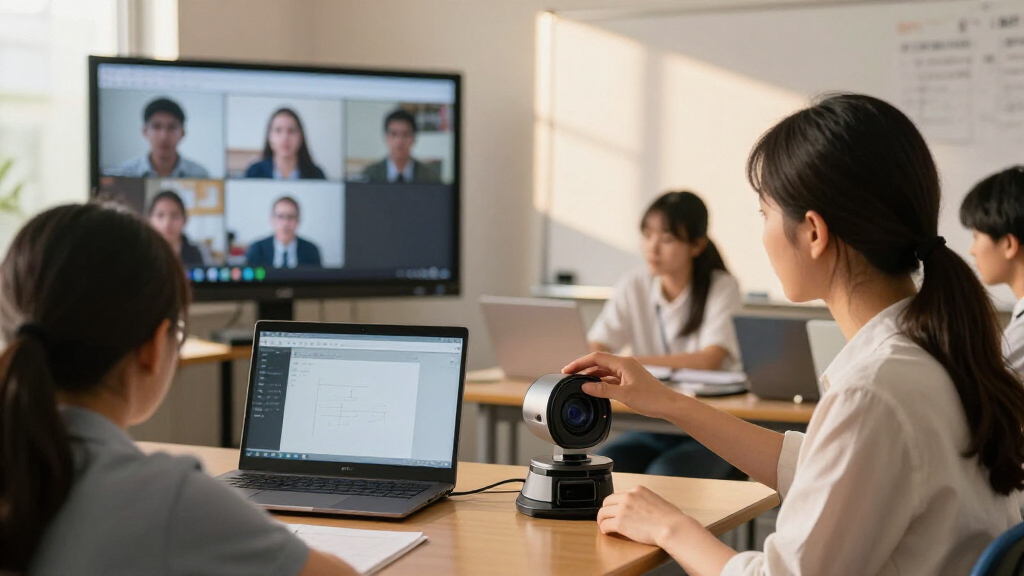
I ranked these nine visualizers by how well their stated features address the everyday demands of a hybrid AI classroom: showing printed work clearly, keeping setup manageable, fitting common teaching materials, and supporting a camera position that works for both in-room and remote learners. I gave weight to resolution and focus together rather than treating a larger megapixel figure as a guarantee of a better live lesson. Lighting, microphone inclusion, foldability, A3 coverage, and added scanning functions also shaped each product’s role.
The order favors balanced classroom utility over a single standout specification. The Gawervan ranks first for combining 4K, autofocus, lighting, and a foldable A3 design; the IPEVO V4K and IRIScan offer distinct alternatives around image detail and scanning. Models with more limited or less clearly differentiated feature sets sit lower, though they may fit narrower needs. I also considered likely setup and workflow tradeoffs, and did not treat AI compatibility as a given: buyers should confirm software, operating system, and conferencing support for their own classroom platform.
| visualizers for hybrid ai classroom | Connectivity | Focus |
|---|---|---|
| INEBIZ IB280 Document Camera w | HDMI, USB | — |
| PAKOTOO 8MP USB Document Camer | — | Autofocus |
| Kitchbai 8MP USB Document Came | USB-C | Autofocus |
| IRIScan Visualizer 7 4K 13MP U | USB Type-C; UVC/UAC compliant | — |
| USB Document Camera with Manua | USB, USB-C | Manual |
| IPEVO V4K 8MP Ultra High Defin | USB | — |
| PAKOTOO 5MP USB Document Camer | — | — |
| Gawervan 4K Document Camera wi | USB 2.0 | Autofocus; macro focus range of 3.94 inches |
| THUSTAND USB Document Camera w | — | Manual and autofocus |
Factors to Consider When Choosing Visualizers For Hybrid Ai Classrooms
A classroom visualizer is part of a larger teaching setup, not a standalone answer to hybrid instruction. I would choose one by starting with the materials students need to see and the way the camera will fit into lesson delivery, then checking that the device works with the classroom’s computer and software.
Match Resolution to What You Teach
High resolution helps when remote learners need to read small print, inspect diagrams, or follow detailed handwriting. It matters less when the camera is aimed at large, bold text, and image quality can still be limited by lighting, focus, and the conferencing platform. A common mistake is choosing by megapixel count alone without checking how close the camera can frame a page or object. If lessons regularly include fine detail, compare resolution alongside focus performance and the camera’s working distance. For ordinary worksheets and demonstrations, reliable framing may improve the lesson more than an upgrade in pixel count.
Choose Autofocus or Manual Control for Your Teaching Style
Autofocus can reduce interruptions when a teacher moves between a book, a worksheet, and a small object. Manual focus can suit a fixed overhead setup where the subject rarely changes, but it can slow a live demonstration if the camera needs frequent adjustment. Autofocus is not automatically better: reflective pages, moving hands, or busy backgrounds can complicate focusing. Think through how often materials change during a typical lesson and whether the teacher can reach the camera controls easily. A short setup check with representative materials can reveal more than comparing a feature list.
Check Page Coverage and Camera Placement
A3 support is useful for large worksheets, maps, and open books, but only if the camera can capture the whole area clearly from its working position. A compact footprint can be more valuable when the visualizer must share a desk with a laptop, tablet, or teaching materials. Foldable designs help with storage and room changes, though the arm and base still need to hold a steady position during use. Before choosing, measure the largest material you expect to show and the available desk or mounting space. Avoid assuming that a stated page format guarantees comfortable framing for every object or teaching angle.
Treat Audio and Lighting as Parts of the Whole Setup
Built-in microphones and LEDs can reduce the number of accessories on a teacher’s desk, but they do not replace a room-specific audio and lighting plan. A camera microphone may pick up nearby voices or classroom noise differently from a headset or dedicated microphone. LEDs can help with a dim desk, yet glossy pages may reflect light and make text harder to read. Check where the camera light falls and whether the teacher can adjust the page or camera angle to limit glare. If clear speech is the priority, compare the visualizer’s audio role with the computer, room microphone, or conferencing system already in use.
Verify USB, Software, and AI Workflow Compatibility
A USB connection may simplify camera setup, but buyers still need to check compatibility with their computer, operating system, and meeting or classroom software. Do not assume that an AI teaching platform will automatically recognize every document camera or expose all of its controls. Confirm whether the camera appears as a video source in the applications used by teachers, and check if any required software is supported by school devices. If AI tools will interpret text or diagrams, clear capture and a stable feed matter more than a feature label alone. School IT policies can also restrict downloads, permissions, or external devices, so verify those constraints before ordering.
Pay for Workflow Improvements, Not a Longer Feature List
Extra capabilities are worth paying for when they solve a recurring classroom task, such as scanning paper resources for later use or quickly changing between large documents and small objects. A dedicated scanner function can help teachers who digitize materials, while it may add little for lessons that only show pages live. Similarly, a built-in microphone is less valuable if the classroom already uses a reliable audio system. List the tasks the visualizer must handle each week and separate those from occasional conveniences. This keeps a high-spec choice from becoming an underused device and helps identify when a simpler camera better fits the teaching routine.
Frequently Asked Questions
Will these visualizers work with AI teaching or video-conferencing software?
Many USB document cameras can act as a camera source, but that does not guarantee support in every conferencing or AI application. Check the product’s operating-system requirements and confirm that your specific software can select an external USB camera. School-managed computers may block device access or require approved drivers. If AI tools need to read text or analyze diagrams, test a sample lesson with the actual platform and materials before relying on the setup. Compatibility should be confirmed for the full classroom workflow, not just the camera connection.
Is autofocus worth prioritizing for live lessons?
Autofocus is most useful when a lesson moves between different page sizes, handwritten work, and objects held near the camera. It can reduce the need to interrupt teaching to adjust the image. A fixed overhead setup with one consistent document may work well with manual focus and can make autofocus less important. Focus behavior can vary with lighting, motion, and reflective surfaces, so test the camera with the materials students will actually see. For a fast-paced lesson, focus reliability may matter more than a modest resolution increase.
Should I choose a document camera with a built-in microphone?
A built-in microphone can make a basic setup easier by reducing extra equipment, especially when the teacher speaks near the camera. It may not provide the clearest classroom audio if the teacher moves around or students contribute from different parts of the room. A headset or dedicated room microphone can better suit lessons where speech clarity is a major concern. Avoid assuming that a camera’s microphone will replace the audio system already used for remote learners. Compare the device with your room size, teacher position, and existing conferencing equipment.
Do I need A3 coverage if I usually teach from books and worksheets?
A3 coverage is helpful for large worksheets, maps, open books, and demonstrations that spread across a wide surface. For standard pages, it may not change daily teaching, and a smaller setup can leave more room on a crowded desk. Check both the largest material you teach from and the camera’s framing distance; a format label by itself does not tell you how conveniently the page will fit. If your materials vary by class, broader coverage can reduce repositioning. If they rarely exceed a standard page, prioritize focus and placement instead.
When is a scanning feature worth choosing over a simpler live visualizer?
A scanning feature has added value when teachers regularly turn paper handouts, notes, or student work into digital files for later sharing or archiving. It is less useful if the only goal is showing a page during a live lesson and existing school tools already handle scanning. Consider how often digitization happens and whether the camera’s software fits the school’s storage and privacy rules. A scanning function should not distract from checking live image quality and classroom compatibility. The IRIScan Visualizer 7 is the clearest fit in this roundup for buyers who want both live display and portable A3 scanning.
Conclusion
For the broadest mix of hybrid teaching needs, I recommend the Gawervan 4K Document Camera as best overall, thanks to its autofocus, LED light, and foldable A3 design. The PAKOTOO 5MP is my best value-style pick for buyers who want autofocus, lighting, and dual microphones in one device; the IRIScan Visualizer 7 is the best premium-style choice for those who will use its 4K, 13MP capture and A3 scanning workflow. Beginners who want a straightforward 8MP USB option should look at the IPEVO V4K, while teachers who often change rooms may prefer the portable, foldable format of the Gawervan or IRIScan. For a narrower need—showing small details with optical zoom—the INEBIZ IB280 merits a closer look. Before choosing, check software compatibility and test the camera with the materials and lighting in your classroom.
Halloween Picks
halloween
As an affiliate, we earn on qualifying purchases.