TL;DR
Signal has introduced controls that block screenshots and screen recordings by default on supported iPhones and turn on Android Screen security when an AI assistant tries to read the app. The protections have limits, including Mac computers, notifications, files and the recipient’s device; Signal says it wants operating-system makers to provide a documented opt-out for AI data access.
Signal announced new controls on November 20 to limit AI assistants’ access to chats displayed on users’ phones, blocking screenshots by default on supported iPhones and enabling Android’s Screen security setting when an assistant tries to read the app. The change addresses a gap in end-to-end encryption: messages are decrypted on a phone to appear on screen, where an assistant may be able to access them.

Get business pricing on tech for your team
- Business-only prices and quantity discounts
- Tax-exempt purchasing
- Multiple users, one account, clear invoices
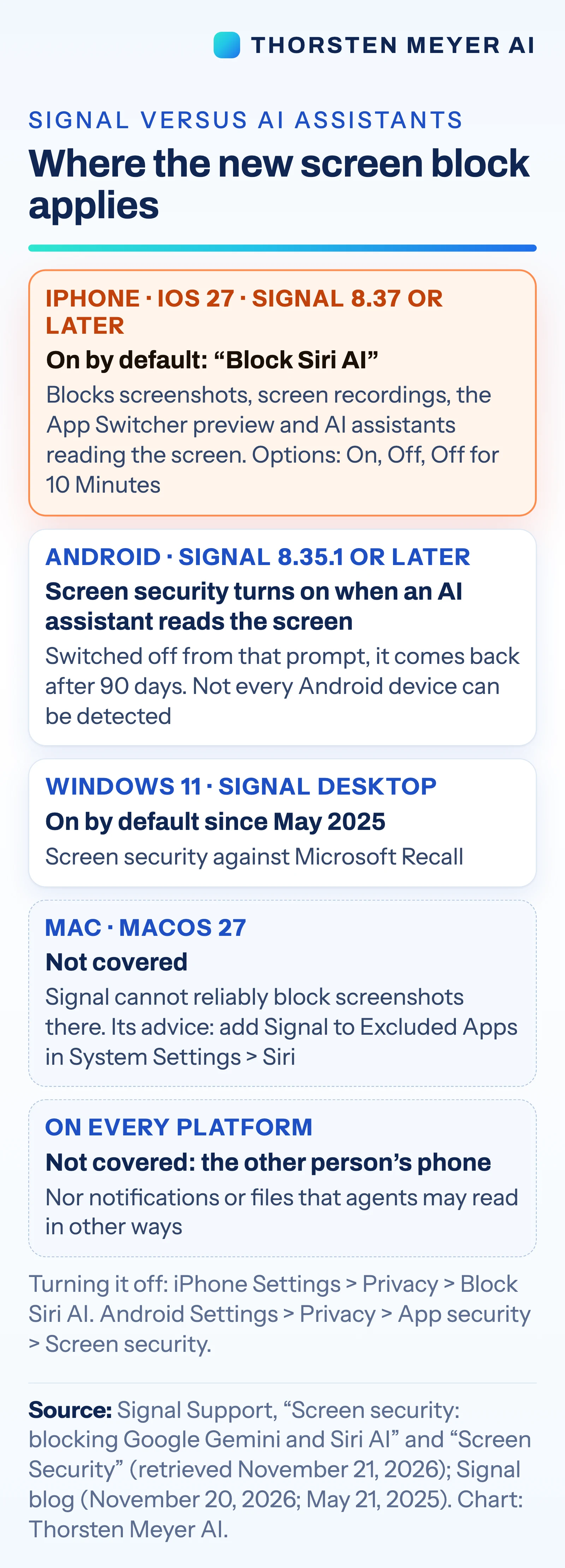
On iPhones running iOS 27 with Signal version 8.37 or later, a setting called “Block Siri AI” is on by default, according to Signal’s support page. Signal says it blocks screenshots and screen recordings in the app, hides chats in the App Switcher and prevents on-device AI assistants from reading Signal’s screen. Users can change the setting under Settings → Privacy → Block Siri AI, choosing On, Off or “Off for 10 Minutes.”
On Android, the change applies to Signal version 8.35.1 or later. Signal says Screen security turns on automatically the first time an AI assistant tries to read the app’s screen. Users can manage it in Settings → Privacy → App security → Screen security. Signal warns that turning the setting off may expose both a user’s chats and messages from their contacts to AI assistants.
The protections do not cover every path to content. Signal says it cannot reliably block screenshots on Mac, and the Android feature may not detect some assistants. The controls also do not cover notifications, files or the device of the person receiving a message. Signal’s announcement describes the measures as incomplete.
Where Screen Access Meets Encryption
Encryption protects messages in transit between phones, but a device must decrypt them to display a conversation. Signal’s concern is that an assistant with access to screen content could capture information after decryption, beyond the messenger’s control. Signal said captured data could end up in “whatever local database or remote server” an assistant uses.
The change makes screen access a practical issue for anyone using private messaging alongside built-in assistants. For businesses, it also signals that apps may restrict agents that read screen content, potentially limiting what those agents can do inside sensitive services. The scope of any such restrictions will depend on the device, operating system and app.
Screen capture can also support accessibility tools and other legitimate functions. The source material does not detail how those uses are affected or provide a breakdown of which assistants are blocked in each case. Users and organizations may need to weigh the added protection against the features they rely on.
Products Worth Considering

Bose TV Speaker Compact Soundbar with Bluetooth and HDMI-ARC, Black

Jackery Solar Generator 1000 v2 with 200W Solar Panel, 1024Wh LiFePO4 Battery

LG UltraGear 34G600A-B 34-Inch Curved WQHD Gaming Monitor
As an affiliate, we earn on qualifying purchases.
Signal’s Earlier Screen Protections
Signal previously addressed automated screen capture on desktop. On May 21, 2025, it enabled Screen security by default in Signal Desktop on Windows 11 to guard chats against Microsoft’s Recall feature. Signal’s account says Recall takes screenshots every few seconds, extracts text using optical character recognition and stores it in a searchable on-device database.
The latest controls target AI features built into phones. Apple described its Siri AI as having “onscreen awareness” in a September 14, 2026 announcement. Google announced Gemini Intelligence on May 12, 2026, according to the source material. The timing matters because these features can use what appears on a screen, the same content Signal’s mobile protections seek to shield.
Signal president Meredith Whittaker said in the company’s November 20 post that operating-system AI agents pose “an existential threat to Signal, and our ability to responsibly uphold our mission.” Signal is also asking Apple, Google and Microsoft for a documented way for apps to opt out of AI data access.
““Onscreen awareness.””
— Apple
Limits Across Devices and Content
Signal has not described universal coverage. It says Mac screenshots cannot be reliably blocked and that Android may not detect an assistant trying to access the screen. The source material does not specify which Android devices or assistants fall into that detection gap, or how often the controls prevent capture in practice.
It is also unclear how notifications and files are handled by individual AI assistants, and the controls cannot prevent access from a message recipient’s phone. The source material provides no independent testing results or detailed account of how assistant providers store or process content they receive. Those points remain outside what Signal’s announcement establishes.
A Request for System-Level Controls
Signal says it is asking Apple, Google and Microsoft for a simple, documented method for apps to opt out of AI data access. The source material gives no timetable or response from those companies, so it is not clear whether they will offer such controls or how they might work.
For now, users can review Signal’s privacy settings on supported iPhones and Android devices and decide whether to leave the protections on. Further details about device coverage, assistant detection and the companies’ responses would clarify how much screen content the measures can keep from AI systems.
Key Questions
What does Signal’s new iPhone setting do?
On iOS 27 with Signal 8.37 or later, “Block Siri AI” is on by default. Signal says it blocks screenshots and screen recordings in the app, hides chats in the App Switcher and stops on-device AI assistants from reading Signal’s screen.
How does the Android protection work?
On Signal 8.35.1 or later, Screen security turns on when an AI assistant tries to read the app’s screen, according to Signal. The company says some assistants may not be detected.
Can users turn the controls off?
Yes. On iPhone, users can select Off or “Off for 10 Minutes” under Settings → Privacy → Block Siri AI. On Android, the setting is under Settings → Privacy → App security → Screen security. Signal warns that disabling protection may expose chats to AI assistants.
Does this protect messages on every device?
No. Signal says it cannot reliably block screenshots on Mac, Android may not detect every assistant, and the controls do not cover notifications, files or the recipient’s phone.
Why can an AI assistant access an encrypted message?
End-to-end encryption protects a message while it travels between phones. The receiving phone decrypts it to show the text on screen; an assistant with screen access may be able to capture what is displayed.
Source: Thorsten Meyer AI