
TL;DR
A November 19 comparison matches four AI setups to different workloads: a Mac mini for agents and small local models, a Mac Studio for very large open models, an Nvidia PC for CUDA-focused work, and cloud APIs for leading closed models. The recommendations are based on published specifications and tool documentation, not independent performance tests.
The guide says an always-on agent using cloud models can run on a Mac mini because the computer handles the agent loop, files and tools while the model runs remotely. Apple lists the base Mac mini at 4 watts at idle. That figure describes idle power, not consumption during active work, and the guide cautions that prompts and data still go to the cloud model provider.

Get business pricing on tech for your team
- Business-only prices and quantity discounts
- Tax-exempt purchasing
- Multiple users, one account, clear invoices
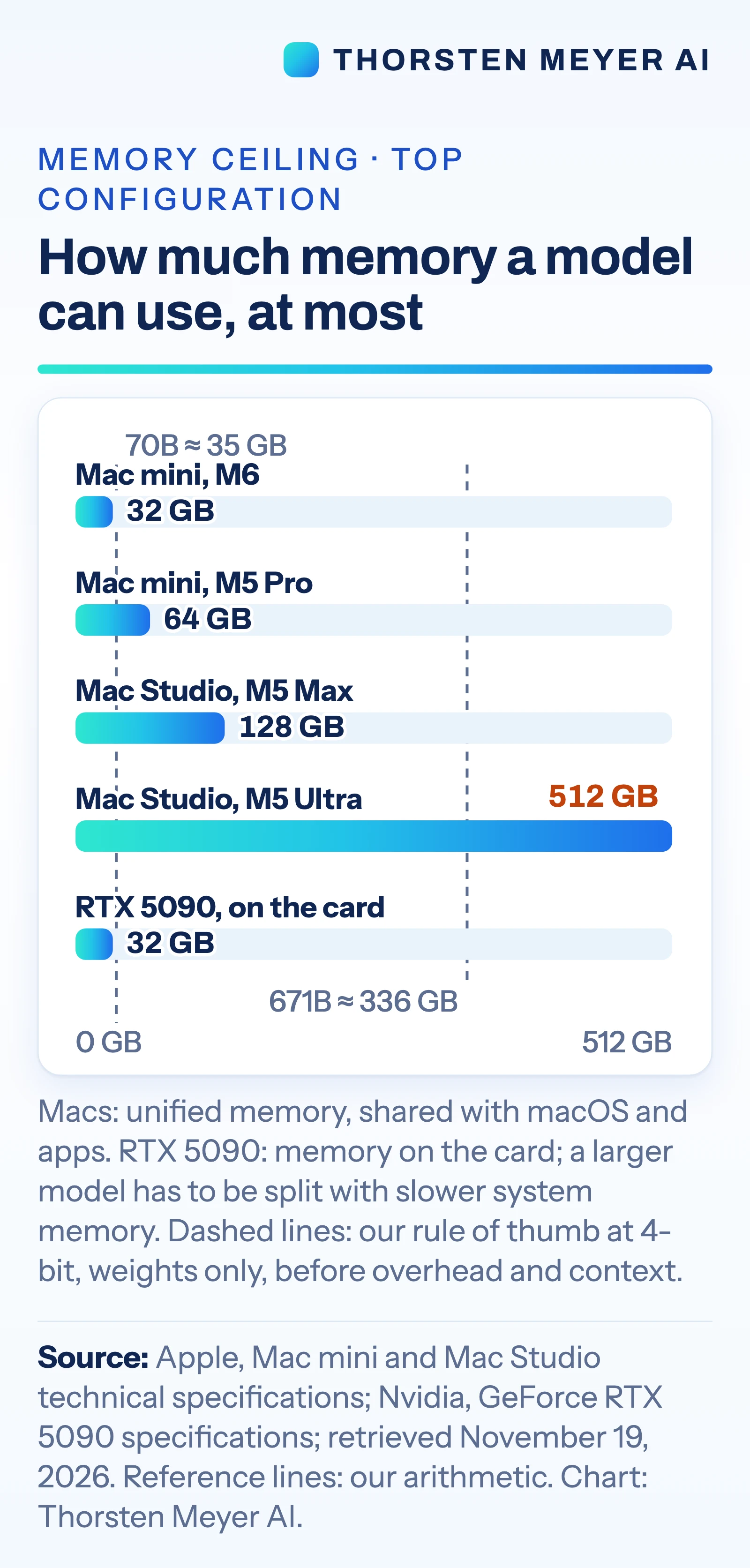
For local models, the comparison emphasizes memory capacity. It lists Mac mini configurations up to 64 GB, Mac Studio options up to 128 GB with M5 Max and 512 GB with M5 Ultra, and Nvidia’s GeForce RTX 5090 with 32 GB of graphics memory. The guide estimates that a 4-bit model needs about half a gigabyte per billion parameters for weights alone: roughly 35 GB for a 70-billion-parameter model and 336 GB for a 671-billion-parameter model. Those estimates exclude overhead and conversation context.
The guide assigns CUDA-focused serving, training and multi-user work to an Nvidia GPU PC or rented GPU capacity, citing broader CUDA support in tools such as vLLM. It says Apple’s MLX supports LoRA and QLoRA fine-tuning and PyTorch supports GPU training on Mac, while large-scale training is not a desktop task. Its comparisons draw on manufacturer specifications and software documentation checked November 19; they are not independent speed tests.
Memory and Software Shape the Choice
The comparison matters because “running AI” can mean very different things. A machine that keeps a cloud-based agent operating around the clock has different requirements from one that stores a model locally or serves requests to a team. Buying for the wrong job can mean paying for memory or graphics hardware that a workload does not use, or finding that a preferred tool lacks the needed support.
For local inference, the guide’s memory examples show why model size alone can rule out a device: weights must fit alongside runtime overhead and context. For team serving and tools built around CUDA, software compatibility may matter as much as raw hardware. The guide also flags trade-offs in power and cost: Apple lists the M5 Ultra Mac Studio at up to 385 watts for the system, while Nvidia rates the RTX 5090 card at 575 watts and recommends a 1,000-watt system power supply.
These figures provide a starting point for matching equipment to a task, but they do not establish comparative speed, total operating cost or answer quality. The guide says its job-to-machine matches are its interpretation of published specifications and documentation.
Products Worth Considering

Bose QuietComfort Ultra Headphones (2nd Gen), Wireless Noise-Cancelling Over-Ear Headphones, Driftwood Sand

Sonos Era 100 SL Compact Microphone-Free Speaker, Black

Logitech MX Mechanical Wireless Illuminated Keyboard, Tactile Quiet, Graphite
As an affiliate, we earn on qualifying purchases.
From Mac Mini to Cloud API
The comparison follows an earlier article about what models fit within a Mac mini’s 16 GB to 64 GB memory range. It broadens the question from one computer to four approaches: a compact Mac, a higher-memory Mac Studio, a PC with an Nvidia graphics card, and a cloud API.
Its guide suggests a Mac mini for a personal assistant using a small open model, and a Mac mini with 64 GB or a Mac Studio with M5 Max for mid-sized models and longer documents. It assigns models with hundreds of billions of parameters to the 512 GB M5 Ultra Mac Studio, while warning that the US list price cited for that configuration starts at $5,499. For the strongest closed models, which the article says are not downloadable, it points to cloud APIs.
Connecting Macs into a cluster is possible, according to the source, but requires Thunderbolt 5, a cable between each pair and a macOS Recovery setting change. The source says the base M6 Mac mini has Thunderbolt 4, so its specifications do not match that cluster setup.
Performance Tests Are Still Missing
The comparison does not provide independent benchmark results for the listed machines, including the Mac Studio running very large models. Actual speed and capacity depend on the model, quantization, context length, software and workload; the guide’s memory calculations cover weights only and do not measure performance.
It also does not compare total costs across purchase prices, electricity, cloud usage and ongoing maintenance. The cited $5,499 starting price is a US list price for the M5 Ultra Mac Studio as of November 19, 2026. Cloud API pricing and data-handling terms vary by provider, and the guide does not specify one service or rate.
Test Against Your Own Workload
The guide’s next step for buyers is to identify whether the model will run locally or through a cloud API, then check the model’s memory needs and the software tools required. Its comparisons are based on specifications and documentation available on November 19, 2026; they do not predict results for every configuration.
A practical decision will depend on testing the intended model and tools with representative prompts, documents and user demand. The source does not announce future benchmark work or a follow-up date, so independent performance comparisons remain an open need.
Key Questions
Which setup does the comparison recommend for an always-on agent?
A Mac mini is its suggested fit when the agent calls cloud models and the computer mainly runs the loop, files and tools. The model and prompts still go to the cloud service.
How much memory does a very large open model need?
The guide estimates that a 671-billion-parameter model at 4-bit precision needs about 336 GB for weights alone. That estimate excludes overhead and conversation context, so it is not a complete system requirement.
When does an Nvidia GPU PC make sense?
The comparison favors an Nvidia GPU PC for workloads using tools built around CUDA, including some serving and training workflows. It notes the RTX 5090’s 32 GB of graphics memory and 575-watt card rating.
Does the comparison include independent speed tests?
No. It is based on manufacturers’ specifications and software documentation checked November 19, 2026, and says there are no independent speed tests for very large models on the cited Mac Studio setup.
Source: Thorsten Meyer AI