This checklist is for AI builders planning inference hardware, whether you are assembling a workstation or putting together a rack server. It helps you think through the parts that affect compute, storage, memory, access, and networking.

Get business pricing on tech for your team
- Business-only prices and quantity discounts
- Tax-exempt purchasing
- Multiple users, one account, clear invoices
The sections follow those hardware roles, with a separate advice-only slot for the AI accelerator card. The listed picks identify products to investigate; their names alone do not confirm compatibility or suitability for a particular workload.
Use each section to check the specifications that matter to your build, then confirm fit with your server, motherboard, operating system, and other components. Treat the checklist as a starting point for validating a complete system.
AI Accelerator Card
An accelerator can shape the inference capacity and deployment options of a system, so begin with the workload rather than a product name. Identify the models you intend to serve, how many users or requests you expect to handle at once, and whether your software stack supports the accelerator family under consideration. The right choice depends on these details and the rest of the platform.
A common mistake is choosing hardware based on a headline specification while overlooking memory capacity, software support, and system constraints. Check the accelerator’s memory against model requirements, and confirm that drivers, libraries, and inference tools support the intended configuration. For a multi-accelerator setup, review motherboard slot spacing, available lanes, power delivery, and cooling together. Do not assume that a card will fit simply because the chassis has open slots; verify its dimensions and clearance against the chassis and neighboring components.
Before buying, confirm the exact card dimensions, power connectors, operating requirements, and supported host configuration from the manufacturer. Match those details to the server’s motherboard, power supply, and airflow plan. If a specific product has not been selected, keep this slot open until the workload and platform requirements are clear.
What to look for:
- Memory capacity that fits the models you plan to serve
- Driver and inference software support for your deployment
- Physical dimensions and clearance in the intended chassis
- Motherboard slot layout and available PCIe lanes
- Power connectors, power delivery, and cooling requirements
GPU Server Chassis
A chassis matters because it must accommodate the GPU layout, cooling plan, and rack setup you intend to use. The listed pick is the Silverstone RM52 5U Rackmount Server Chassis with Dual 360mm Liquid Co. Its name points to a 5U rackmount format and dual 360mm liquid-cooling support, but those details alone do not establish compatibility with your components.
One common mistake is treating radiator support as proof that a complete liquid-cooling configuration will fit. Check radiator and fan placement, tubing routes, pump and reservoir space, GPU length and thickness, motherboard format, and power supply clearance. Also verify the rack’s available depth and mounting requirements. A 5U chassis still needs to fit the specific rails, cabling, and service access in your rack. Confirm the manufacturer’s full specifications before ordering, especially since the product name is abbreviated.
For a GPU system, review airflow and component clearance as a complete assembly, not as separate product listings. Check that the chassis layout leaves room for all planned cards and does not obstruct their cooling. Confirm that the motherboard’s connectors and slot positions align with the chassis, and that the system can be serviced once installed. Make a component-by-component fit list before committing to this enclosure.
What to look for:
- Full chassis specifications and supported motherboard formats
- GPU length, thickness, slot spacing, and clearance
- Radiator, fan, pump, and tubing placement for the cooling plan
- Rack depth, rail compatibility, and service access
- Power supply dimensions and cable routing space
Silverstone RM52 5U Rackmount Server Chassis with Dual 360mm Liquid Cooling

The Silverstone RM52 is a 5U rackmount server chassis compatible with various motherboard sizes, supporting dual 360mm liquid cooling radiators. It features 8 expansion slots and a front USB-C port, with options for quick sliding rail installation (rail kit sold separately).
Pros:
- Supports a wide range of motherboard sizes
- Supports dual 360mm liquid cooling radiators
- Includes front USB-C port
- Designed for easy sliding rail installation
Cons:
- Rail kit sold separately
- Limited information on airflow and noise levels
Best for: Builders considering a 5U rackmount GPU enclosure
Not ideal for: Systems whose component fit has not been verified
Bottom line: Confirm the complete GPU, cooling, motherboard, and rack fit before selecting the RM52.
High-Speed NVMe SSD
Fast storage can support model files, datasets, and active workloads, but the right drive depends on how your server is built and used. The listed pick is the Micron 9300 Max 6.4TB NVMe U.2 Enterprise SSD. Its name identifies a 6.4TB U.2 NVMe drive; verify the complete interface, form-factor, and platform requirements before treating it as a fit for your system.
A frequent mistake is assuming an NVMe drive can connect to any available storage bay. Check whether the server has a compatible U.2 bay or adapter, the correct cabling, and motherboard or backplane support for the drive’s interface. Confirm that the host can provide the required PCIe connection and that the chosen bay supports the drive’s form factor. Also check operating-system and firmware support. A capacity figure alone does not tell you whether the drive suits your workload or host.
Decide what the drive will hold and whether capacity and endurance needs match that role. For a system serving models, consider how model files, logs, and other data will be organized, then ensure the capacity works alongside your other storage. Validate the exact product specifications, including connector and power requirements, against the chassis and storage controller. Confirm the drive’s physical fit and installation method before purchase.
What to look for:
- U.2 bay or adapter support in the server
- NVMe interface and PCIe connection compatibility
- Capacity suited to model files and other planned data
- Backplane, cabling, and storage controller support
- Physical fit and installation requirements
Micron 9300 Max 6.4TB NVMe U.2 Enterprise SSD

The Micron 9300 Max is an internal enterprise SSD designed for data centers and high-performance computing workloads. It offers 6.4 TB of capacity and NVMe performance, with sequential throughput reported at up to 3.5 GB/s.
Pros:
- High 6.4 TB storage capacity
- NVMe performance for enterprise workloads
- Sequential throughput reported above 3.5 GB/s
- 5-year warranty
Cons:
- Designed for enterprise and data center use, which may limit compatibility with consumer systems
- No price is provided
Best for: Servers with confirmed U.2 NVMe support
Not ideal for: Hosts with unverified bays or storage connections
Bottom line: Match the Micron drive’s exact interface and form factor to the host before ordering.
ECC Server Memory
Memory capacity and platform support affect whether a server can run its intended models and concurrent workloads. The listed pick is the A-Tech 128GB DDR5-4800 ECC Registered Server RAM Kit (8 x 16GB). Its name specifies an eight-module kit totaling 128GB, DDR5-4800, ECC, and registered memory; check the server documentation to determine whether those characteristics are supported.
A common buying mistake is matching only the memory generation or total capacity. ECC registered modules are not interchangeable with every server memory configuration, and the product name does not confirm support for a particular processor or motherboard. Check the system’s supported memory type, module capacity, speed, ranks, and population rules. Confirm whether all eight slots are available and whether installing this kit affects supported speeds or other memory configurations. Follow the platform’s instructions for channel and slot population.
Consider the memory needs of the models and services running together, including the host operating system and any supporting processes. Compare that target with the server’s maximum supported capacity and the slots available for future expansion. Verify the exact module part number against the motherboard or server compatibility list, and confirm that the kit arrives as the intended matched set. If any platform details are unknown, check them before purchasing the RAM.
What to look for:
- ECC registered memory support on the server
- DDR5-4800 support for the processor and motherboard
- Module capacity, ranks, and population guidance
- Eight available compatible slots for the listed kit
- Part-number match with the server compatibility list
A-Tech 128GB DDR5-4800 ECC Registered Server RAM Kit (8 x 16GB)

This 128GB kit includes eight 16GB DDR5 ECC Registered DIMMs designed for compatible server systems. The 288-pin, 1.1V modules run at up to 4800 MHz and should not be mixed with other ECC module types; verify system compatibility before installation.
Pros:
- High 128GB total capacity
- ECC Registered memory for compatible servers
- Limited lifetime warranty
Cons:
- Not compatible with desktop or laptop computers
- Cannot be mixed with EC4 or other ECC memory types
- Compatibility depends on the server model and memory configuration
Best for: Platforms confirmed to support this memory type
Not ideal for: Systems with undocumented memory requirements
Bottom line: Verify registered ECC support and module population rules for the exact server before buying.
Rackmount KVM Console
A rackmount console can make local server access and administration more convenient when you need to work directly at the rack. The listed pick is the Tripp Lite NetDirector 8-Port Rackmount Console HDMI KVM Switch with 1. The product name indicates an eight-port HDMI KVM switch, but the remaining name is truncated, so confirm the full model and included components in the product documentation.
A common mistake is assuming that a KVM’s connector type and port count cover every system in the rack. Check the video output and input connections for each server, along with keyboard and mouse requirements, any adapters, and supported resolutions. Confirm whether the console includes the cables needed for your equipment and whether the KVM supports the operating systems and boot access you rely on. Verify the exact model’s port switching method and any requirements for connecting multiple machines.
Before selecting a rackmount console, measure the rack space and confirm mounting depth and access for the console and its connected cables. Review how the display and input tray open, and make sure nearby equipment will not obstruct use. If you manage more than eight machines, plan how the other systems will be accessed. Validate that the KVM’s video path and controls match each host, especially if the rack combines different server generations.
What to look for:
- Full product model and complete included-item list
- HDMI compatibility with every host’s video output
- Port count matched to the machines you need to control
- Keyboard, mouse, resolution, and boot-access support
- Rack mounting dimensions, depth, and cable access
Tripp Lite NetDirector 8-Port Rackmount Console HDMI KVM Switch with 17" LCD, IP

The Tripp Lite NetDirector B030-008-17-IP is a compact 1U rack‑mountable KVM console that combines an eight‑port HDMI switch, a 17‑inch full‑HD LCD, keyboard and touchpad. Built‑in IP remote access lets you manage up to eight servers from anywhere via LAN or Internet, supporting up to 64 authorized users and 32 concurrent remote sessions.
Pros:
- IP remote access enables management from any location over LAN or Internet.
- Compact 1U dual‑rail design saves rack space while keeping the monitor visible.
- High‑resolution 17" LCD provides clear on‑screen display up to 1080p.
- Supports up to 64 authorized users with multi‑level password security.
Cons:
- Heavy at 26 lb, which may be cumbersome for some rack installations.
- Requires separate KVM cable kits (sold separately) for USB/HDMI connections.
Best for: Racks needing a local multi-host console
Not ideal for: Setups with unverified video or input connections
Bottom line: Check the full Tripp Lite model, host connections, included cables, and rack fit before selecting it.
10GbE Network Adapter
A network adapter determines how a server connects to the rest of the inference and storage environment. The listed pick is the 10GbE SFP+ Network Card Compatible with BCM57810S 2-Port PCIe 2.0 Adap. The name indicates two SFP+ ports and BCM57810S compatibility, but is abbreviated, so confirm the complete model and supported host details before purchase.
A common mistake is treating an SFP+ port as a ready-to-use Ethernet connection without checking the rest of the network. Confirm the transceivers or direct-attach cables required for your switches and cable runs, and verify that the switch ports support the planned link. Check driver availability for the server’s operating system and confirm the card’s PCIe interface, slot clearance, and bracket fit. If the card is intended for a particular server brand or configuration, validate that compatibility from the card and system documentation.
Plan how the two ports will be used, including whether they connect to separate switches or serve a specific network design. Confirm that the server has an appropriate PCIe slot and driver support, and that the physical bracket matches the chassis. Compare the card’s interface with the motherboard’s available slots and account for any other installed expansion cards. Resolve the full product name and specifications first, then check the adapter against the switch, cabling, and operating system.
What to look for:
- Complete card model and BCM57810S support details
- Two SFP+ ports suited to the network design
- Compatible transceivers or direct-attach cables
- PCIe slot, bracket, and chassis fit
- Operating-system driver support and switch compatibility
10GbE SFP+ Network Card Compatible with BCM57810S 2-Port PCIe 2.0 Adapter
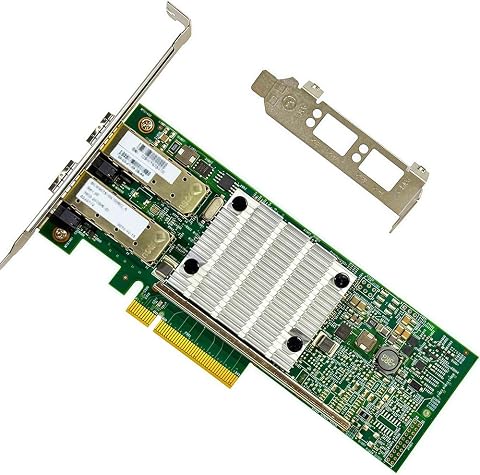
This dual-port 10GbE SFP+ network card features SFP+ ports supporting 10GBASE-SR/LR modules, ideal for high-speed server and NAS connections. It offers virtualization, jumbo frames, PXE/iSCSI boot, and flexible deployment options for enterprise and data center use.
Pros:
- Supports high-speed 10GbE SFP+ connectivity for servers and NAS devices
- Flexible deployment with full-height and low-profile brackets
- Features advanced virtualization and offload capabilities
Cons:
- Requires compatible SFP+ modules (not included)
- Limited warranty period of 3 months
- Requires specific SFP+ modules for RJ45 connections
Best for: Hosts with compatible PCIe slots and SFP+ switching
Not ideal for: Networks with unverified optics or driver support
Bottom line: Confirm the full adapter model, PCIe fit, drivers, switch ports, and cabling before ordering.
Prioritize purchases by starting with the workload and host platform, then confirm the accelerator and chassis fit. Next validate memory type and capacity, followed by storage connectivity and network requirements. Choose rack access equipment after you know how many systems and connection types it must support. This order helps each component decision reflect the specifications of the system around it.
Keep the product names as a shortlist, and check the full manufacturer documentation and exact part numbers before placing an order. A careful compatibility pass can make the build process clearer and help you assemble an inference system that fits its intended role.