
TL;DR

Get business pricing on tech for your team
- Business-only prices and quantity discounts
- Tax-exempt purchasing
- Multiple users, one account, clear invoices
A buying guide from Thorsten Meyer AI compares 12 AI video-editing software listings, including CyberLink PowerDirector and Adobe Premiere products. It favors PowerDirector 2027 Ultra for many Windows creators, but the recommendations depend on workflow, platform, learning curve and license terms; the source does not provide independent performance tests or a complete feature-by-feature comparison.
Thorsten Meyer AI has published a 2027 buying guide comparing 12 AI video-editing software listings, recommending CyberLink PowerDirector 2027 Ultra as its leading fit for many Windows creators seeking AI-assisted editing in a familiar desktop workflow. The guide places Adobe Premiere Pro with users who want a professional editing environment and Premiere Elements with people who prefer more guided tools, while noting that the choice depends on each creator’s workflow and tolerance for complexity.
The guide’s main distinction is between approachable editing tools and software aimed at users who want more control. It describes PowerDirector 2027 Ultra as offering prompt-based Video Edit by Chat alongside timeline editing. The source also lists AI audio cleanup and object removal, as well as controls such as keyframes and motion tracking. It says the software requires compatible 64-bit Windows and an internet connection for download and activation.
Adobe Premiere Pro is presented as the professional-focused option, with tools the guide says can mask subjects, extend clips, generate captions and enhance audio. Its license is described as a one-year subscription. Premiere Elements 2027 offers Quick, Guided and Advanced modes, according to the guide, but its license runs for three years rather than being perpetual. A separate Photoshop Elements and Premiere Elements Student and Teacher Edition is restricted to eligible students and teachers.
Other listings address narrower needs. The guide describes CyberLink bundles that pair video editing with PhotoDirector, which may suit creators handling still images as well as video. Nero Video is listed with multi-track editing, green-screen and picture-in-picture tools, and HD, 4K and 8K exports; the source says its described AI capability centers on media management rather than generative editing. The guide warns that repeated product names can refer to different versions, bundles or license formats, so buyers should check what is actually included.
Choose by workflowNot by the AI label
Thorsten Meyer AI compares 12 software listings for 2027 buyers. Its recommendations are workflow-based advice, not independent performance test results.
Match tools to your editing needs
AI features vary by product and edition, from prompt-based editing to captions and media organization.
PowerDirector 2027 Ultra
The guide’s leading fit for many Windows users seeking AI-assisted editing with a familiar timeline workflow.
Adobe Premiere Pro
Positioned for users who want a professional editing environment and greater control.
Premiere Elements 2027
Quick, Guided and Advanced modes offer a more guided route, with a three-year license.
Bundles and other listings
Some CyberLink bundles pair video editing with PhotoDirector; Nero Video focuses on editing tools and media management.
Check the exact edition
Product names can cover different versions, bundles, features and license terms.
Decide whether you need prompt-based editing, object removal, captions, audio tools or media organization.
Check your operating system, hardware and internet requirements for the specific product.
Verify the license term, bundle contents and whether some AI features require separately purchased credits.
Compare the trade-offs
A broad AI claim says less than the workflow, platform and license details.
- Premiere Elements offers Quick, Guided and Advanced modes.
- May suit creators who prefer more direction.
- Its license runs for three years, not perpetually.
- Premiere Pro is presented for professional-focused editing.
- PowerDirector combines prompt-based editing with timeline tools.
- Premiere Pro is described as a one-year subscription.
Read the recommendations cautiously
The guide describes products and makes recommendations, but does not establish which editor performs best.
Match AI Tools to Your Workflow
The recommendations matter because AI labels do not describe one standard capability. In this lineup, tools range from prompt-based editing and object removal to captions, audio enhancement and media organization. A creator deciding between them needs to know which task the software supports, whether the feature is available in the chosen edition, and whether it requires an internet connection or separately purchased credits.
License and platform details can also change the effective cost and usability. The source identifies subscription, three-year and one-time purchase arrangements, alongside Windows-only requirements and bundles that include photo applications. These distinctions may be more consequential than a broad claim that a product uses AI: a video-only creator may not benefit from bundled photo tools, while a professional editor may value greater timeline control over a guided interface.
The guide is a buyer’s comparison, not a reported software test. It offers product descriptions and recommendations but provides no independent benchmark results, measured time savings or evidence that one editor performs better across common tasks. Readers should treat its rankings as workflow-based advice rather than a verified performance ordering.
Products Worth Considering
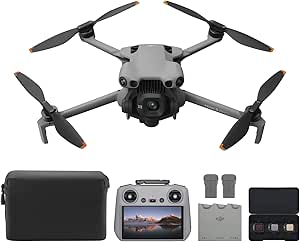
DJI Mini 5 Pro Fly More Combo Plus with DJI RC 2

Apple AirPods Pro 3 Wireless Earbuds with Active Noise Cancellation

Bose QuietComfort Wireless Noise-Cancelling Headphones, Twilight Blue
As an affiliate, we earn on qualifying purchases.
The Guide’s Product Comparisons
The source groups its advice around 12 product listings and several distinct user needs, including social-video editing, school projects, screen recording, photo-and-video work and professional editing. Its top-line recommendation for PowerDirector 2027 Ultra is specifically framed around Windows users. It does not establish that the same choice is best for Mac creators or for every type of production.
The guide also distinguishes editions and bundles within product families. PowerDirector 2026 is described as including screen and webcam capture, while other PowerDirector listings refer to 2027 editions, one-time licenses or photo-editing bundles. Some generative AI features in CyberLink products may require separately purchased credits, according to the source. Adobe’s Elements products use guided modes, but the student and teacher edition has eligibility and activation requirements. These differences make checking the precise listing important.
Limits of the Available Comparison
The source does not state when the guide was published, provide its evaluation method, or show hands-on test results. It is therefore unclear whether the 12 listings were tested under the same conditions or how the recommendations account for editing speed, output quality, reliability or total cost. The guide’s product descriptions and recommendations are attributable to Thorsten Meyer AI, whose post says it was created with AI assistance; they are not independent confirmation of vendor claims.
Some listing text is repeated or truncated, and the material does not give complete prices, system specifications for every product, or a full account of which features are included in each license. Availability and feature sets can change. Buyers should verify current terms, supported hardware and any credit or connectivity requirements with the software seller before purchasing.
Check Editions Before Buying
The next step for buyers is to compare the exact version and license against their own workflow: identify required AI tasks, confirm the operating system and hardware, and check whether internet access or extra credits are needed. Creators considering a bundle should decide whether the photo application is useful enough to justify its inclusion; those choosing a time-limited license should account for its term.
The source does not announce a follow-up test or a future update to the guide. Since software versions and pricing can change, readers should confirm current details with vendors and look for independent tests before treating the listed recommendations as a final verdict.
Key Questions
Which editor does the guide recommend for many Windows creators?
It identifies CyberLink PowerDirector 2027 Ultra as its leading fit for Windows users seeking AI-assisted editing in a familiar desktop workflow. That is the guide’s recommendation, not an independent performance finding.
How does the guide distinguish Premiere Pro from Premiere Elements?
The guide positions Premiere Pro for users seeking a professional editing environment and notes its one-year subscription. It presents Premiere Elements 2027 as a more guided option with Quick, Guided and Advanced modes and a three-year license.
Do all the listed AI features work without extra requirements?
No. The source says some CyberLink generative AI features require separately purchased credits; it also lists internet requirements for certain products and editions. Check the specific version and feature terms before buying.
Does the guide prove which software performs best?
No. The supplied material gives recommendations and feature descriptions but no independent benchmarks or comparative test results. Its rankings should be read as buying advice based on the stated use cases.
Source: Thorsten Meyer AI