
An effective edge AI starter setup should include properly calibrated hardware, like durable sensors and robust processing units, to guarantee accurate data collection. You’ll want efficient power management, such as sleep modes and hardware supporting power features, to extend device life. Choose a compatible software environment that supports real-time processing and security updates. Reliable connectivity options like Wi-Fi or LTE with strong security are essential. Finally, opt for modular components and thorough documentation to support future growth. Keep exploring to learn how to optimize each element.
Key Takeaways
- Calibrated sensors and reliable hardware to ensure accurate data collection and system durability.
- Power management features like sleep modes and dynamic scaling to optimize energy use.
- Compatible, lightweight AI software supporting real-time processing and easy updates.
- Secure connectivity options such as Wi-Fi or LTE for reliable data transfer and protection.
- Modular design with thorough documentation for scalability and future system expansion.

Getting started with Edge AI setup can seem intimidating, but with the right approach, you can quickly deploy intelligent solutions closer to data sources. The foundation of any effective Edge AI system begins with guaranteeing your hardware is properly configured. Sensor calibration is essential; it guarantees that your sensors provide accurate, reliable data. Without proper calibration, the data collected might be flawed, leading to incorrect inferences and decisions. Spend time calibrating each sensor according to the manufacturer’s specifications, and verify accuracy through test runs. Proper calibration not only boosts performance but also reduces errors that could compromise your system’s effectiveness. Additionally, reliable hardware, such as durable sensors and robust processing units, plays a crucial role in maintaining system integrity over time. Power management is another indispensable component. Since Edge AI devices often operate in environments with limited power sources, optimizing power consumption becomes necessary. Implement strategies such as dynamic power scaling, which adjusts processing power based on workload, or sleep modes, where devices enter low-power states when idle. Efficient power management extends device longevity, reduces operational costs, and assures consistent performance even in off-grid or remote locations. It’s important to choose hardware that supports these features and to configure them appropriately during setup. Alongside hardware considerations, you need to set up the software environment. Select an Edge AI platform compatible with your hardware, and verify it supports necessary functionalities like real-time data processing and model deployment. Installing lightweight, optimized AI models is imperative for faster inference and lower power usage. Regularly updating software and security patches keeps your system resilient against vulnerabilities. Additionally, hardware durability ensures your setup remains functional over time, especially in challenging environments. Incorporating security protocols into your deployment plan is also vital to safeguard sensitive data and prevent unauthorized access. Connectivity options should also be part of your initial setup. Reliable communication channels—whether Wi-Fi, LTE, or wired Ethernet—are fundamental for transmitting data to centralized systems or cloud services when needed. Moreover, selecting hardware with robust connectivity options can improve data transfer reliability and reduce downtime. Establish secure, stable connections to prevent data loss or breaches, especially if your deployment handles sensitive information. Finally, consider scalability and future expansion. Your Edge AI setup should be designed with flexibility in mind. Modular hardware components, such as interchangeable sensors and expandable storage, allow you to adapt as your needs evolve. Document your setup process thoroughly, including calibration procedures and power configurations, so that future adjustments or scaling efforts are straightforward. With these elements in place—precise sensor calibration, efficient power management, solid hardware and software choices, reliable connectivity, and scalability—you set a strong foundation for a successful Edge AI deployment that operates seamlessly and reliably right from the start.
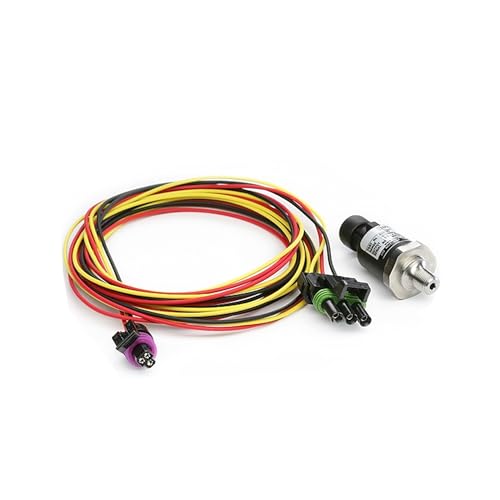
Edge 98607 EAS Pressure Sensor – 0-100 psig
Monitor wet/dry pressures on your vehicle from boost, fuel, fluid, etc…
As an affiliate, we earn on qualifying purchases.
As an affiliate, we earn on qualifying purchases.
Frequently Asked Questions
What Are the Key Hardware Components for an Edge AI Setup?
You’ll need key hardware components like edge sensors, which capture real-time data from your environment, and data storage devices to keep this information accessible locally. A powerful edge device, such as a compact AI-enabled computer or specialized hardware, processes the data efficiently. Guarantee good connectivity options for seamless data transfer, and include backup power supplies to keep your system running reliably. This setup optimizes performance and minimizes latency in your Edge AI deployment.
How Do I Ensure Data Security at the Edge?
Did you know that 70% of data breaches involve weak access controls? To guarantee data security at the edge, you should implement robust data encryption, making sure data is unreadable if intercepted. Additionally, enforce strict access control policies, limiting who can access sensitive information. Regularly update security protocols and monitor device activity. These steps help prevent unauthorized access, safeguarding your edge AI environment against potential threats.
What Software Tools Are Recommended for Edge AI Deployment?
You should choose software tools that support seamless cloud integration and offer an intuitive user interface for easy deployment and management. Look for platforms like NVIDIA JetPack, AWS IoT Greengrass, or Microsoft Azure IoT Edge, which facilitate real-time data processing at the edge. These tools simplify device management, enable secure cloud connections, and provide user-friendly dashboards, helping you deploy and monitor your Edge AI solutions efficiently.
How Can I Optimize Power Consumption in Edge AI Devices?
Remember, a penny saved is a penny earned. To optimize power consumption in your edge AI devices, focus on enhancing power efficiency and utilizing energy harvesting techniques. Use low-power hardware components, implement sleep modes during inactivity, and fine-tune algorithms for minimal processing power. Regularly monitor energy consumption to identify inefficiencies, and consider renewable energy sources where possible to extend device longevity and reduce overall energy costs.
What Are Common Challenges Faced During Edge AI Implementation?
You’ll face challenges like integrating edge AI devices with the cloud, which can complicate data flow and security. Scalability becomes tricky as your network grows, making it hard to maintain performance and manage resources efficiently. Ensuring seamless connectivity while balancing latency and data privacy also adds complexity. Planning for flexible infrastructure and robust cloud integration strategies helps you overcome these hurdles, enabling smoother deployment and effective expansion of your edge AI solutions.
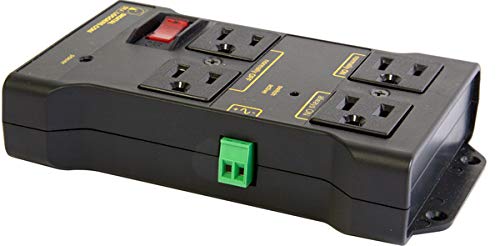
Iot Relay – Enclosed High-power Power Relay for Arduino, Raspberry Pi, PIC or Wifi, Relay Shield, Automatic
Safe, Reliable Power Control
As an affiliate, we earn on qualifying purchases.
As an affiliate, we earn on qualifying purchases.
Conclusion
With the right edge AI starter setup, you’re ready to hit the ground running. Make sure your hardware, data, and software are all aligned to get the most out of your system. Remember, Rome wasn’t built in a day, so don’t rush the process. Stay patient, test thoroughly, and keep tweaking your setup. Soon enough, you’ll see your edge AI project thrive—proof that with the right foundation, you can turn dreams into reality.

PUSR USR-M300 High Performance Edge Computing Industrial IoT Gateway Protocol Conversion NodeRED Development Gateway Expander IO (Ethernet Version)
Multiple Internet access methods is offered: Global frequency LTE 4G/3G & Ethernet port & ADSL.
As an affiliate, we earn on qualifying purchases.
As an affiliate, we earn on qualifying purchases.

Deep Learning Architectures for Embedded Communication and IoT Systems: Structured Data Exchange Mechanisms Across Compact Processing Units
As an affiliate, we earn on qualifying purchases.
As an affiliate, we earn on qualifying purchases.